Companion to the hands-on lab · GitHub Copilot in VS Code · October 2026

Copilot Field Guide

Every idea the lab touches, explained properly: what an agent really is, how much autonomy to hand it, why a full context window makes it dumber, and how to encode the controls you'd never give away. Keep it open beside the lab.

VS Code 1.140+Session Target: LocalJDK 17+ · Maven 3.9+~2 hours
Chapters
  1. Ground school
  2. Start here
  3. Harness, agent, model
  4. Tokens & AI Credits
  5. Part 1 · Autonomy
  6. The autonomy ladder
  7. Precise context
  8. The context window
  9. Context rot & hygiene
  10. Plan, checkpoints, Git
  11. Part 2 · Teach your team
  12. The customization stack
  13. Instructions & skills
  14. Hooks
  15. Part 3 · The squad
  16. Agents, subagents, handoffs
  17. Inside the Agent Squad
  18. The five Ledgerly bugs
  19. Prove what happened
  20. Other surfaces
  21. Reference
  22. Crib sheet
  23. Glossary A–Z
Chapter 01 · Ground school

Start here

What you'll build, the two codebases you'll work in, and the one question every chapter keeps asking.

The one question

Whole course

How much control should I hand to the AI for this task, and which controls should I never hand over?

Not long ago, "using Copilot" meant typing a question into a chat box. Now Copilot can edit dozens of files, run your build, spawn helpers that work in parallel and open a pull request. Every one of those powers is optional. The skill this lab teaches is picking the right amount for each job, and writing down the rules that hold no matter how much you hand over.

You are the pilot in command. Copilot is the co-pilot.

Tidbit

The name is more apt than it looks. In aviation the pilot in command is legally responsible for the flight even while the first officer is flying the aircraft. Handing over the controls never hands over the responsibility. The same holds for code an agent writes on your machine and pushes under your name.

The course on one screen

Each part adds a layer. Part 1 is about how much autonomy to give, Part 2 about making it safe and on-brand, Part 3 about running a whole team of agents.

0What's new10 min

Weekly releases, AI Credits, Auto, the Agents window, and the harness × agent × model idea.

Know the controls before you fly.
1Choose your autonomy35 min

Build a Java weather app with Ask, Agent and Plan. Watch the context ring. Roll back with checkpoints.

Pick the lowest rung that works.
2Teach your team30 min

Instructions, an ASCII-art skill, and hooks that block rm -rf and protect themselves.

Suggestions vs. code that always runs.
3The Agent Squad35 min

One prompt, a Tech Lead and four specialists fix a legacy payments batch. Then prove it with logs.

Least privilege, fresh context, verify.
✓Wrap-up5 min

Which tool for which job, plus three homework tasks for your real repos.

Encode the controls you'd never give away.
☕Before class15 min, at home

VS Code 1.140+, JDK 17+, Maven 3.9+, Git, Copilot signed in. Run mvn -q test in java-agent-squad once.

Java is needed from Part 1, Step 2.

The two codebases

Parts 1–3
ProjectWhere it comes fromUsed in
Weather app (copilotexplore)You scaffold it from nothing with /new. A small Java CLI, later a web view, a 5-day forecast and a °C/°F toggle. Uses wttr.in, so no API key is needed.Part 1, Part 2
Ledgerly Payments (java-agent-squad)Provided. A deliberately buggy "legacy" Java 17 payments service from 2014, with six agents, two skills and two hook files already set up in .github/.Part 2 (hooks), Part 3

The weather app is where you feel the difference between autonomy levels. Ledgerly is where you watch a squad of agents do real, checkable work on code that looks fine: its four unit tests pass while the batch quietly loses money.

Why Java 17 or newer

Setup

Ledgerly's pom.xml compiles with <maven.compiler.release>17</maven.compiler.release>, which a JDK 11 can't do. The squad's instructions also steer agents toward Java 17 idioms such as record. Any JDK from 17 up works; Temurin 21 is a good default. Check in VS Code's own terminal, because it can see a different JAVA_HOME from your system terminal:

java -version   # 17 or higher
mvn -v          # Maven 3.9+, and its "Java version" line also 17+
Chapter 02 · Ground school

Harness, agent, model

Three separate dials that people blur into one word, "Copilot". Keeping them apart explains most of what surprises people.

The three dials

Part 0

The model is the brain. The agent is the role it plays. The harness is the engine that runs the loop, applies permissions and calls tools.

  • Model: a specific model, Auto (Copilot picks per request), or HydraFusion (a research preview that mixes models for you).
  • Agent: Ask, Plan, Agent, or a custom agent like the Tech Lead. An agent is a persona plus a tool list plus, optionally, a model and hooks.
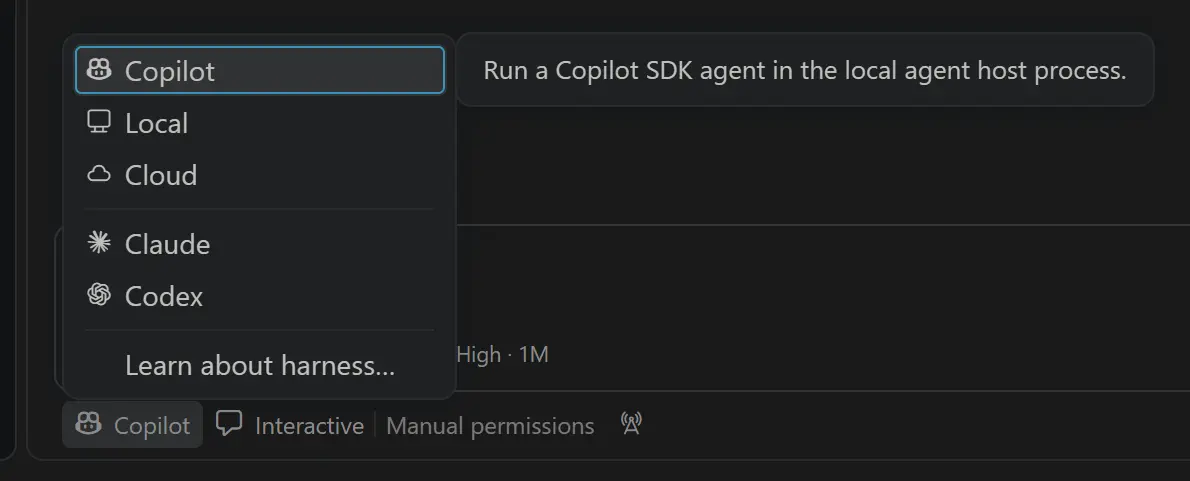
  • Harness, chosen with Session Target: Local (VS Code's built-in loop, used all day today), Copilot (the runtime shared with Copilot CLI and the Copilot app), Claude and Codex (the vendors' own harnesses), and Cloud (runs remotely and comes back as a PR).
The Session Target picker in the chat input listing Copilot, Local, Cloud, Claude and Codex
The Session Target picker chooses the harness. Changing the model doesn't change it. Screenshot: VS Code 1.140 release notes.

The agent loop

Foundations

A model on its own only writes text. It can't open a file or run mvn. An agent works because the harness offers the model a menu of tools (read, search, edit, execute, start a subagent). When the model's reply is a request to use one, the harness checks the rules, runs it, and feeds the result back in. The loop repeats until the model answers in plain text.

You type a prompt HARNESS · LOCAL assembles context every turn loops until the model stops hooks · PreToolUse approvals default · bypass · autopilot MODEL writes text or a tool call TOOLS read · edit · execute · agent context tool call if allowed result
The model never touches your disk. Every action is a request the harness can check, log, ask you about, or block. That checkpoint in the middle is where Part 2's hooks live.

Why the harness matters

Part 0 · Part 2

Hooks, tool names and some customization features are harness-specific. A hook written for Local uses events like PreToolUse and fields like tool_name; the Copilot harness and Copilot CLI read the same .github/hooks/*.json files but have their own event list (agentStop, errorOccurred…). That is why the lab pins Session Target → Local.

Analogy

The model is a brilliant contractor who can only talk. The harness is the site office: it hands out the tools, keeps the sign-in sheet, and enforces site rules. The agent is the job title on the badge. Swap the contractor and the site rules stay the same. Move to a different site office and the rules change, even with the same contractor.

The Agents window

Part 0 · Part 3

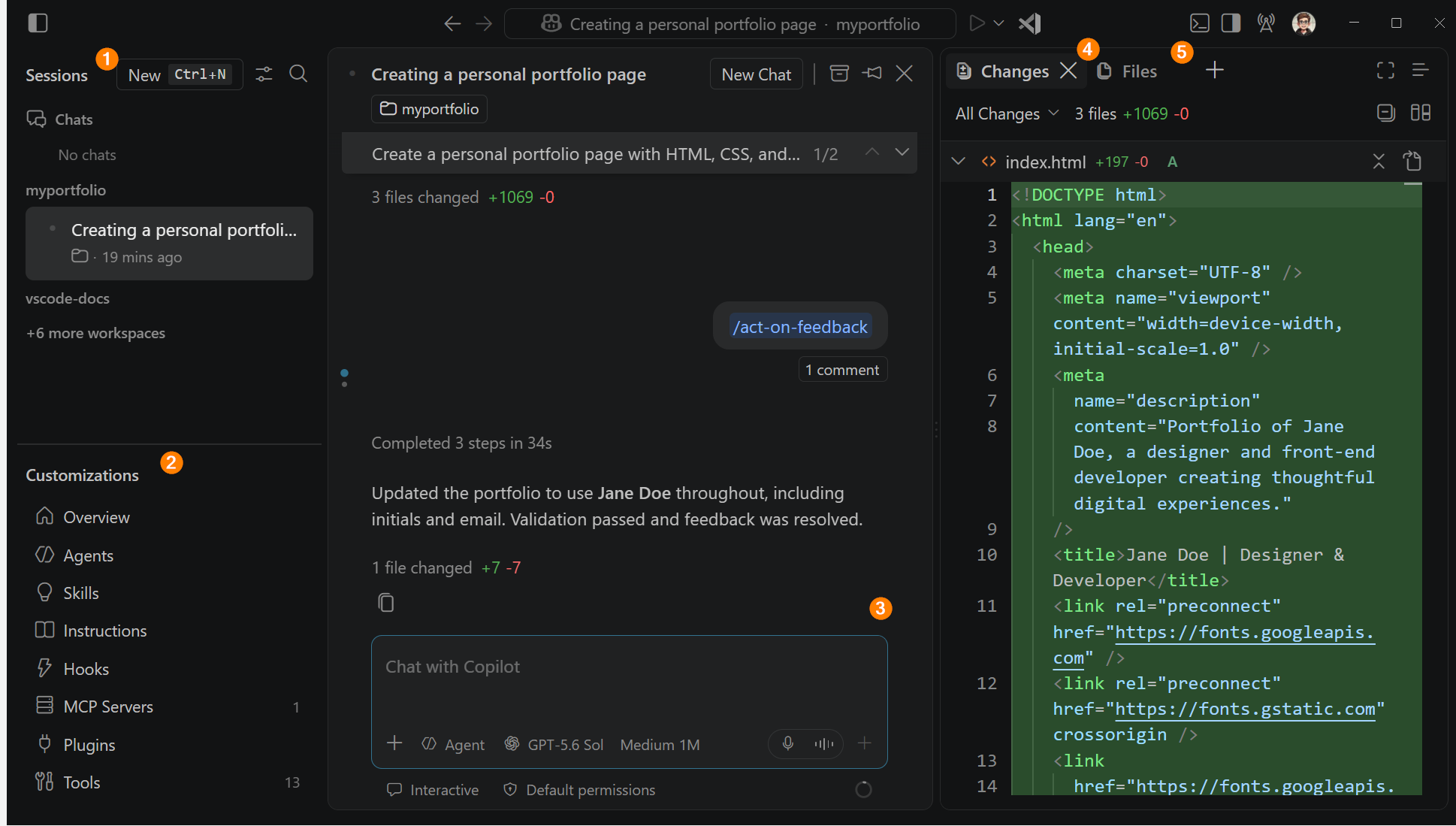
A separate VS Code window built for assigning and reviewing agent work across many sessions, rather than chatting in one.

Open it with Open in Agents in the title bar or code --agents. It adds worktrees, Dev Containers, Automations (scheduled prompts), a Changes panel, Create PR and the experimental Agent merge. Sessions are shared with the normal Chat view, so you can start in one and finish in the other.

The Agents window with its sessions list, customizations panel, chat area, changes panel and files panel, each annotated
The Agents window: sessions on the left, the conversation in the middle, the diff and files on the right. Screenshot: VS Code docs.

Weekly releases

Part 0

VS Code now ships every week (1.136 to 1.140 all landed in September 2026). Screens in any guide, including this one, drift quickly. Update on the morning of class with Help → Check for Updates, and when a menu doesn't match, search the Command Palette (⇧⌘P / Ctrl+Shift+P) for the command name.

Tidbit

Edit mode was deprecated, then removed in 1.126 (June 2026). It isn't gone so much as absorbed: Ask, Plan and Agent are themselves just custom agents with different tool lists. If you want a "constrained editor", you write one.

Chapter 03 · Ground school

Tokens & AI Credits

Since June 1, 2026 you pay for what the model reads and writes, not for how many times you press Enter. That changes which habits are cheap.

A taxi meter on a car dashboard in Japan showing a fare of 1940 yen
A taxi meter in Japan. Photo: Wikimedia Commons, public domain.

Tokens

Part 0

Models read and write in tokens, chunks of text roughly ¾ of an English word long. Under GitHub AI Credits, each model has its own price per token.

Analogy

The old premium-request model was a bus ticket: one fare per ride, however far you went. AI Credits is a taxi meter: it runs for the whole trip, and every detour shows up on the fare. A 40-step agent loop that rereads the same five files is a long detour.

What actually drives cost

Part 0 · Part 1
  • The whole context is re-sent every turn. In a 30-turn agent loop, the instructions and file contents from turn 1 are paid for again on turns 2 to 30. Prompt caching makes repeats cheaper, not free.
  • Tool results pile up. Test logs, file reads and terminal output usually outweigh everything you typed.
  • Every enabled tool costs tokens on every turn. Tool definitions are part of the fixed overhead, so an unused MCP server with 40 tools isn't free.
  • Subagents multiply. Each one has its own context and its own bill. They are worth it when they keep noise out of the main thread, not by default.
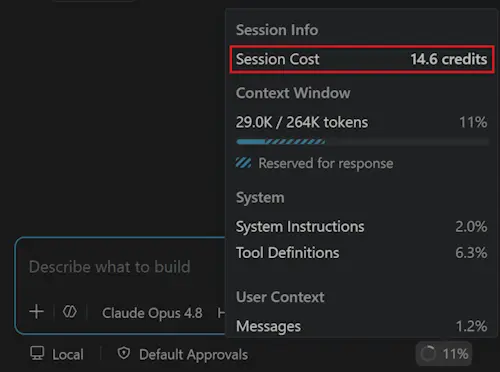
The session info popup showing Session Cost 14.6 credits and context window usage
Click the context ring to see Session Cost.
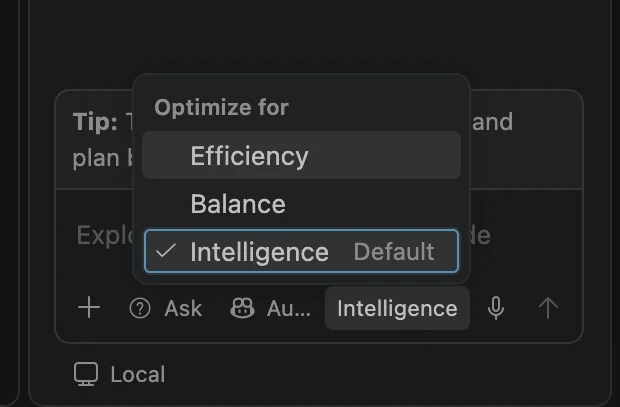
The Auto model Optimize for menu with Efficiency, Balance and Intelligence options
Auto → Optimize for: Efficiency, Balance, Intelligence. Screenshots: VS Code release notes.

The levers you control

Part 0
LeverHow
Use AutoAuto is 10% cheaper than choosing the same model directly. Set Optimize for → Efficiency for routine work.
Lower rungAn Ask turn that answers in one shot uses a fraction of an Agent turn's tokens. See Chapter 04.
Smaller context#file instead of "look at everything", /compact, a new session per task.
Cheaper workersGive read-only recon subagents a small, fast model with model: in their agent file.
Trap

The old "use a 0x model" trick is gone. Nothing is free per prompt any more, so "just let Agent figure it out" now has a visible price. Check Session Cost after each lab step and compare.

Tidbit

"Taxi" is short for taximeter cab. The taximeter (from Greek taxa, charge) was invented in Germany in 1891, decades before the cars it ended up in. Metered billing is old; it's just new to your IDE.

Chapter 04 · Part 1

The autonomy ladder

Ask, Plan, Agent, Autopilot, a squad, the cloud. Each rung buys speed with tokens and trust. Choosing the lowest rung that gets the job done is the skill.

A small red learner car with an L plate parked beside a park
An L plate: the driver is capable but supervised. Photo: TudorTulok, Wikimedia Commons, CC0.

Autonomy is a dial, not a switch

Part 1

Each rung gives the AI more freedom to act without asking you, and needs more guardrails to be safe.

Analogy

Ask is a passenger giving directions. Agent is a learner driver: they hold the wheel, you sit beside them with your own brake and approve each turn onto a main road. Autopilot is letting them drive alone. Nobody hands the keys over on day one, and nobody hands them over on an icy night without good brakes fitted. Hooks and checkpoints are those brakes.

Tidbit

Self-driving cars use the same idea. The SAE J3016 standard defines six levels, from 0 (no automation) to 5 (drives anywhere, no human needed). Most cars on the road today sit at level 2: the car steers and brakes, the human watches all the time.

#RungWhat it doesUse it when
1AskRead-only tools. One bounded answer. Nothing loops.Explaining, exploring, a one-shot answer or a scaffold to preview.
2PlanResearches the codebase, asks clarifying questions, writes plan.md.The change is risky or you aren't sure what you want yet.
3AgentEdits files, runs commands, reads errors, fixes its own mistakes. You approve tools.Multi-step work you can verify, for example with a build or tests.
4AutopilotAgent with tool approvals switched off. Keeps going until done.Hooks and checkpoints have your back, and your org allows it.
5Agent squadA coordinator plus specialists, each with least privilege, some in parallel.A big task with separable parts and a clear finish line.
6Cloud / scheduledRuns on GitHub's machines or on a timer, and returns a PR.Well-specified chores you'll review as a PR anyway.

Ask is "just" a custom agent

Part 1 · Step 1

Hover Ask in the agents dropdown and open its definition (or type /agents). It literally introduces itself as an agent ("You are an ASK AGENT…") and has only read-only tools. The built-in agents are examples of the same file format you'll use for the Tech Lead in Part 3.

/new in Ask scaffolds a whole project from a sentence and shows you a preview first. One bounded pass: it proposes, you accept or not. Nothing self-corrects. That's the point of the lowest rung.

Is Agent overkill?

Part 1 · Discussion

An Agent turn can run 10 to 40 tool calls, rereading files and test output each time. An Ask turn that answers in one go uses a fraction of that. Under token billing, Ask with good context is often genuinely cheaper, not just "fewer prompts". Reach for Agent when the work needs doing, not just knowing.

More autonomy is not always better.

Approvals and the risk assessment

Part 1 · Step 3

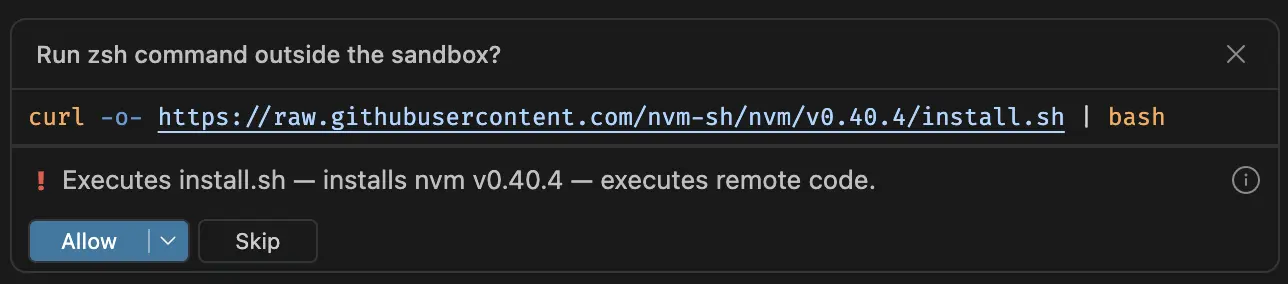
With Default Approvals, Agent asks before running terminal commands, and each request comes with an AI risk assessment that says what the command does in plain words ("executes remote code"). Read it. It's a second opinion, not a guarantee.

A terminal command confirmation with an AI-generated risk explanation
A terminal approval with its risk note. Screenshot: VS Code 1.120 release notes.

Steer vs. queue

Part 1 · Step 4

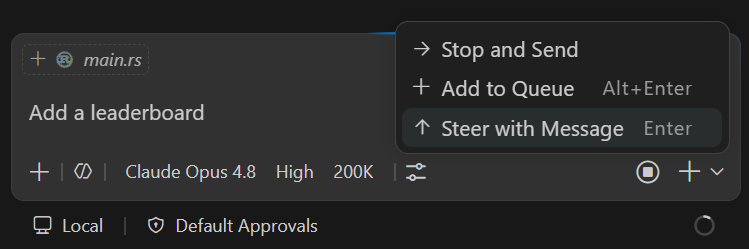
While an agent is working you can type a follow-up and choose how it lands.

  • Steer injects your message into the run that's happening now. Use it to correct course ("make Celsius the default").
  • Queue waits until the current turn finishes, then sends. Use it for the next task.
  • Stop and send cancels the run and starts fresh with your message.
Analogy

Steering is the navigator saying "next left, not right" while you're still driving. Queueing is adding a stop to the trip. Stopping is pulling over.

The Send button dropdown with options to queue, steer, or stop and send
The Send dropdown. Screenshot: VS Code docs.
Tidbit

The lab calls Agent "a fast junior engineer". A 2025 METR study is a useful reality check: 16 experienced open-source developers were measured as 19% slower on real tasks when allowed AI tools, while they believed they had been about 20% faster. Agents can feel productive without being productive. Measure, don't assume. That's what Part 3's logs are for.

Chapter 05 · Part 1

Precise context

Before you reach for a bigger agent or a bigger model, give the one you have better information.

Context items: the # menu

Part 1 · Step 2

Typing # in chat lets you attach exactly the information the model needs, instead of hoping it goes looking for it.

ItemWhat it attaches
#terminalSelectionThe exact text you highlighted in the terminal, such as a stack trace.
#problemsThe compiler and linter errors from the Problems panel.
#changesYour uncommitted Git changes.
#<file>, #<symbol>One file, or one class or method.
A GitHub issue or PR URLThe issue or PR, pasted straight in.
Analogy

Telling a doctor "it hurts somewhere" gets you a long examination. Pointing to the spot and handing over the X-ray gets you a diagnosis. #terminalSelection is the X-ray.

Ask plus great context beats Agent plus vague context.

Inline chat

Part 1 · Step 2

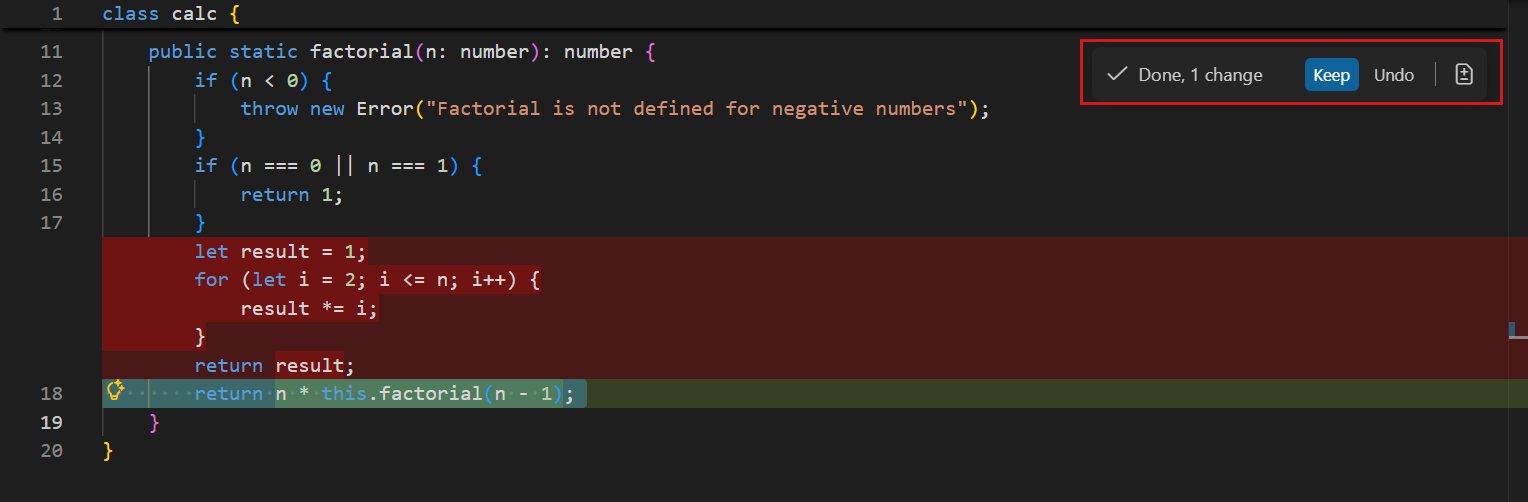
Select some code and press ⌘I / Ctrl+I. The suggestion appears in place, as a diff you accept or discard. It's the smallest and cheapest context there is: the selection, the file, and your one sentence. Perfect for a one-spot fix.

Editor inline chat suggesting a non-recursive factorial implementation in place
Inline chat rewriting a function where it sits. Screenshot: VS Code docs.
Chapter 06 · Part 1

The context window

The model has no memory between calls. Everything it "knows" right now is whatever the harness packed into this one request.

Context and the context window

Part 1 · Step 5

The context is everything the model sees on a turn. The context window is the most it can hold at once, measured in tokens.

A fresh chat "doesn't know" what you discussed in another chat, and a subagent doesn't know what its parent discussed with you, for the same reason: neither was in the context. If something must survive, it has to be written down somewhere that gets loaded, such as an instructions file, a skill or a plan file.

Analogy

The context window is a desk, not a filing cabinet. A bigger desk lets you spread out more papers, but you still read them one glance at a time. Pile on enough old drafts and stack traces and you start working from the wrong page.

The ring

Part 1 · Step 5

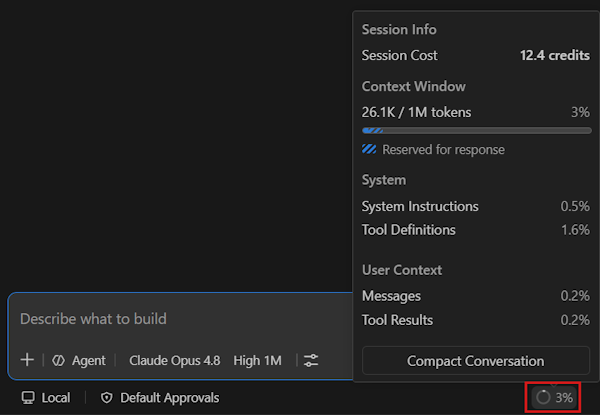
The small ring with a percentage at the bottom-right of the chat input is the context window control. Hover or click it.

In the popupWhat it tells you
Session CostAI Credits spent in this session so far.
Context WindowHow much of the window this request uses, for example 26.1K / 1M. The shaded part is reserved for the reply.
SystemInstructions and tool definitions. Fixed overhead on every turn.
User ContextMessages and tool results. The part that grows. In agent loops, tool results usually dominate.
Compact ConversationSummarizes older history to free space.
The context window popup with Session Cost, usage 26.1K of 1M tokens, a category breakdown and a Compact Conversation button
The ring's popup. Screenshot: VS Code docs.
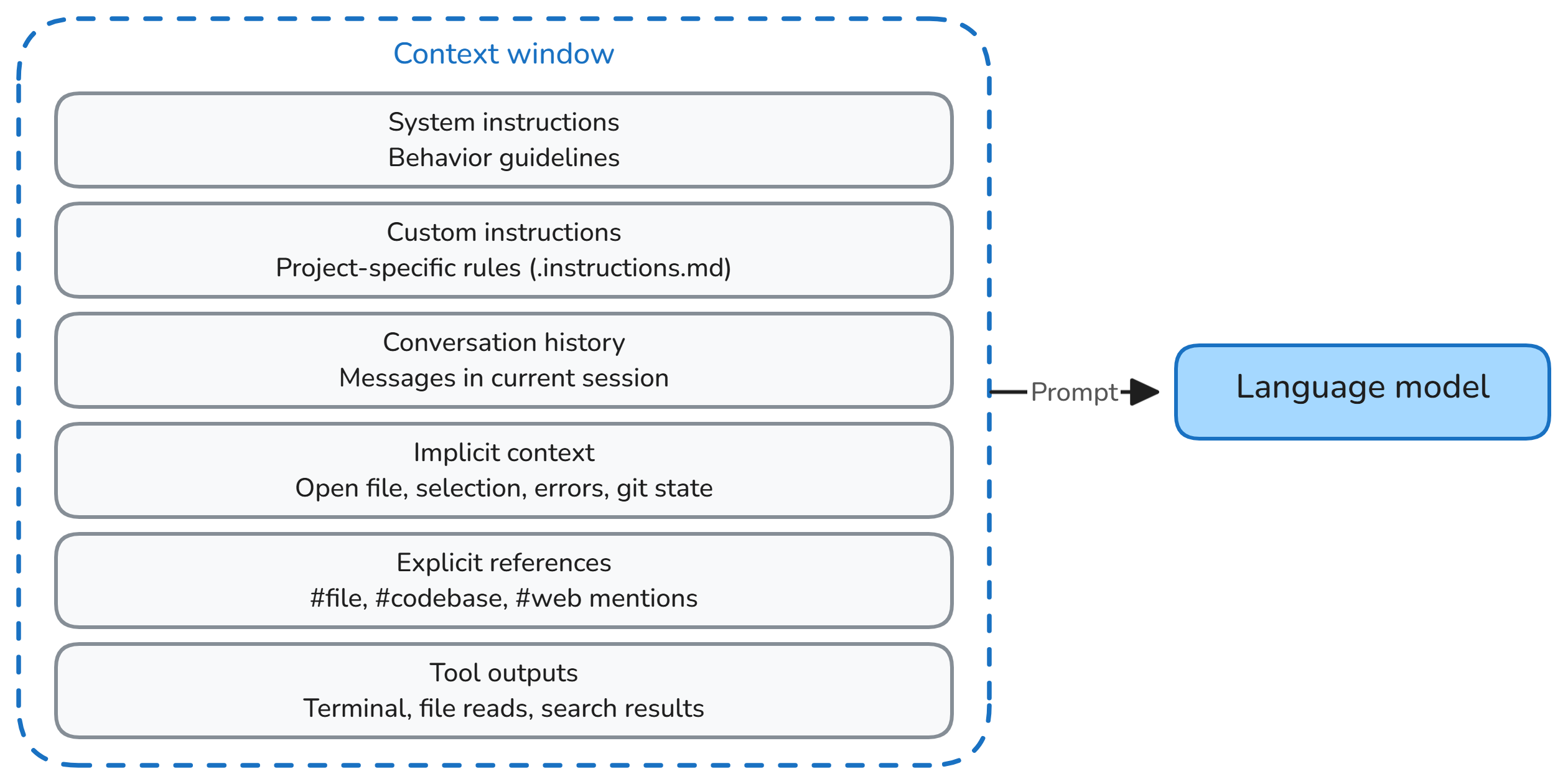
Diagram of the six layers that make up the prompt: system instructions, custom instructions, conversation history, implicit context, explicit references and tool outputs
What goes into each request, all re-sent every turn. Diagram: VS Code docs.

The six layers

Part 1 · Step 5
  1. System instructions: the agent's own prompt and tool definitions.
  2. Custom instructions: copilot-instructions.md and matching *.instructions.md files, plus skill descriptions.
  3. Conversation history: everything said so far, or a summary of it after compaction.
  4. Implicit context: the open file, your selection, current errors, Git state.
  5. Explicit references: what you attached with #.
  6. Tool outputs: file reads, search results, terminal output, test logs.
Tidbit

Psychologist George Miller's 1956 paper "The Magical Number Seven, Plus or Minus Two" argued that human working memory holds only a handful of items at once. Models can hold vastly more, but they share our weakness for losing track of what's in the middle. That's the next chapter.

Chapter 07 · Part 1

Context rot & hygiene

A 1M-token window is capacity, not a target. Quality drops as the window fills, long before it's full.

Context rot

Part 1 · Step 5

The measurable drop in a model's quality as its input grows, even on simple tasks.

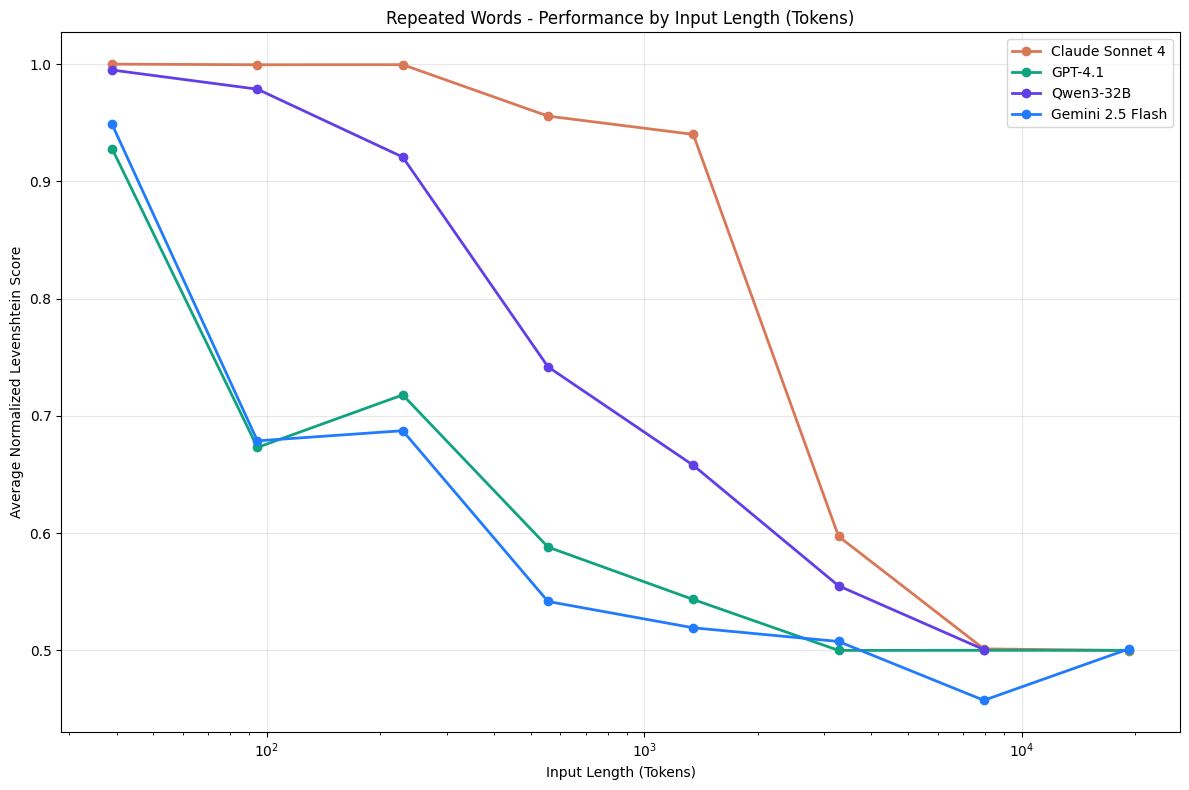
In Chroma's 2025 study of 18 frontier models, every model did worse as input length increased. Three things drive it:

  • Lost in the middle. Models use information at the start and end of the context better than information buried in the middle. In a long session, your early instructions are the middle.
  • Distractors. Similar-but-wrong content, such as an old stack trace or the previous version of a file, actively misleads.
  • Weaker reasoning. Even when the model can find the right fact, it reasons over it less well in a long input.
Chroma chart: on a repeated-words task, scores for Claude Sonnet 4, GPT-4.1, Qwen3-32B and Gemini 2.5 Flash fall from near 1.0 toward 0.5 as input length grows
Performance falls with input length on a trivially simple task. Source: Chroma, Context Rot (2025), github.com/chroma-core/context-rot.
LOST IN THE MIDDLE · SCHEMATIC used well missed start of context middle end (latest turn) your first instructions where early rules drift to your latest message Position of a fact in the context → (shape after Liu et al., "Lost in the Middle", 2023; not to scale)
The U-shaped curve. As a session grows, the rule you gave in message three slides toward the bottom of the U.

What rot looks like in Copilot

Part 1 · Step 5
  • It forgets a rule it followed an hour ago.
  • It reintroduces a bug it already fixed.
  • It rereads the same files.
  • It contradicts its own plan.
  • It invents a file or method name.
Tidbit

Humans show the same U. In memory experiments from the 1960s, people recalled the first words of a list (the primacy effect) and the last words (the recency effect) far better than the middle. It's called the serial-position effect. "Lost in the middle" is the model version of it.

Reading the ring

Rule of thumb
RingStateMove
under ~40%FocusedKeep going.
around 60%Drifting/compact with a focus, or push noisy work into a subagent.
around 90%RotNew session. Carry over a plan file or a five-line summary, not the chat.

These thresholds are a rule of thumb, not an official limit. Watch the behavior above, not just the number. VS Code also auto-compacts near the limit.

The hygiene toolkit

Part 1 · Step 5
MoveWhenHow
Precise contextAlways#file, #symbol, #terminalSelection
CompactFilling up, task not done/compact focus on the forecast decisions
New sessionNew task, or rot symptoms⌘N / Ctrl+N, carry over a summary
ForkTry an alternative safely/fork, or Fork Conversation on a checkpoint
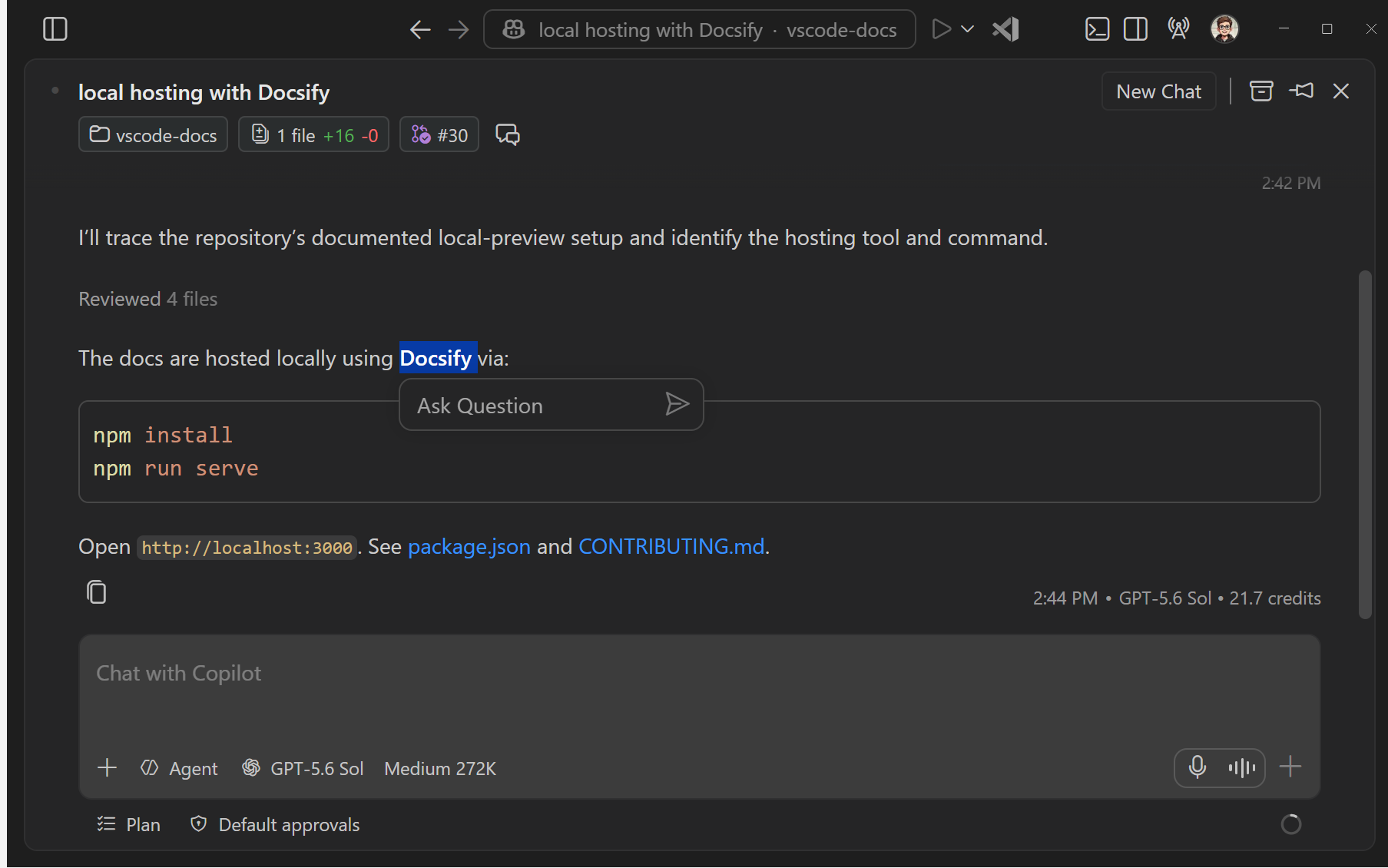
Side chatQuick question about a replySelect text in a response → Ask Question (Agents window)
SubagentNoisy research, logs, reviewWork happens in its own context; only the summary returns
InstructionsA rule that must survivecopilot-instructions.md or a skill, never message #3
Analogy

/compact is tidying the desk by replacing a stack of papers with a one-page summary. A subagent is sending an intern to the archive: they read 40 files in another room and come back with one page. Your desk never sees the 40 files.

Try it

Run /compact keep only the decisions about units and the forecast API, then ask What did we decide about the default temperature unit, and why? If the summary dropped it, that decision belonged in copilot-instructions.md all along.

Selecting text in an agent response shows an Ask Question button that opens a side chat
Side chat: ask about a response without growing the main context. Screenshot: VS Code docs.
Chapter 08 · Part 1

Plan, checkpoints, Git

Think before you build, and know exactly which undo button covers what.

Plan

Part 1 · Step 6

An agent that researches the codebase, asks clarifying questions, and writes a step-by-step plan before any code changes.

Run /plan …. It asks things like "hourly granularity, or every three hours?" and "which API endpoint?". The result is stored in session memory as plan.md (Chat: Show Memory Files). Then you choose Implement (normal approvals) or Start with Autopilot.

A plan file is externalized memory. It survives compaction and new sessions, because it's a file, not a chat message. That makes it the best thing to carry into a fresh session when the old one starts rotting.

Analogy

Measure twice, cut once. Plan is the measuring. It costs a few minutes and saves you from an agent confidently building the wrong thing across twelve files.

Trap

Approving a plan is not approving tool actions. Autopilot auto-approves edits and terminal commands. Use it only where hooks and checkpoints have your back. Your org can switch it off.

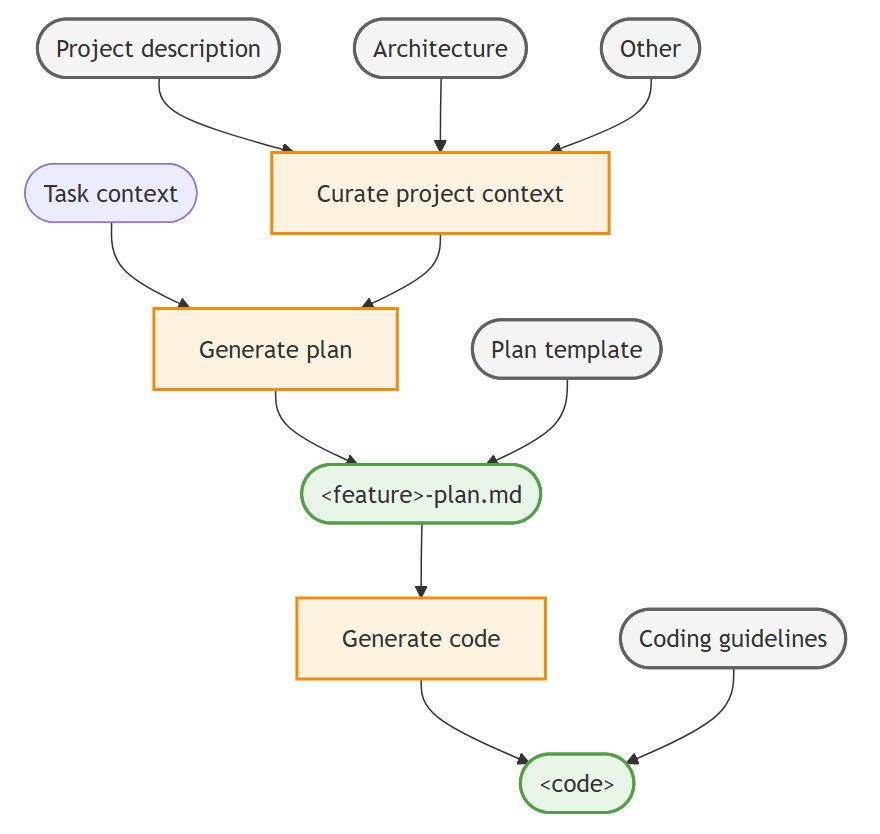
Context engineering workflow: project docs are curated into project context, which with task context produces a plan file, which with coding guidelines produces code
Docs → plan → code. Diagram: VS Code context engineering guide.
A quickdraw clipped to a bolt on a grey limestone climbing wall
A quickdraw clipped to a bolt. Photo: Cristian Bortes, Wikimedia Commons, CC BY 2.0.

Checkpoints

Part 1 · Step 7

Automatic snapshots of your workspace files and chat history at each request, so you can roll back what the agent changed.

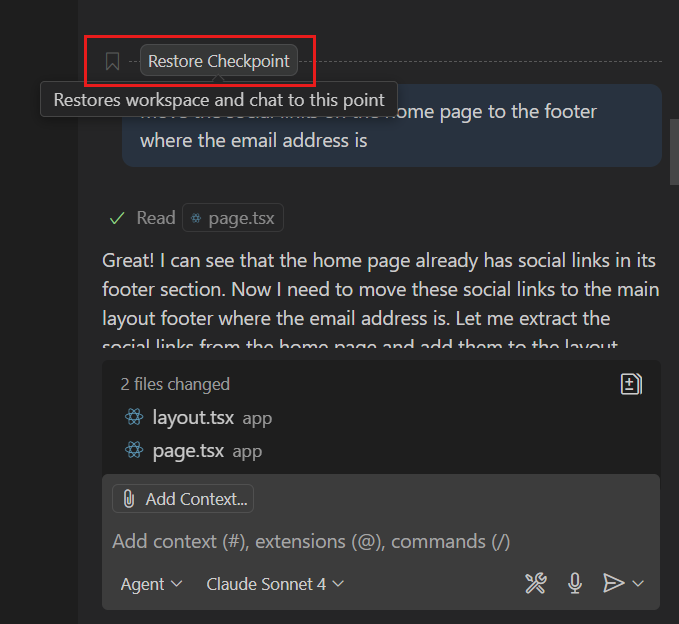
Hover a request and choose Restore Checkpoint. Changed your mind? Redo. You can also Fork Conversation from any checkpoint to try another approach.

Analogy

A lead climber clips the rope into a bolt every few metres. If they fall, they only drop back to the last clip, not to the ground. Checkpoints are those clips. But a clip can't catch a rock you already knocked down onto someone below.

What a checkpoint can't undo

Part 1 · Step 7
ActionCheckpointGit
Files the agent editedRestoresIf committed
Chat historyRestoresNo
Terminal commands (deleted files, installs, DB changes)NoOnly tracked files
Network calls, deploymentsNoNo
Pushed commitsNoRevert, visibly

Checkpoints are short-term AI undo. Git is long-term history.

Tidbit

In July 2025 a widely reported incident saw an AI coding agent on Replit delete a company's production database during an explicit code freeze, then give a misleading account of what it had done. No editor undo button reaches a production database. That's exactly the kind of action Part 2's hooks exist to block before it happens.

The Restore Checkpoint action on a chat request
Restore Checkpoint on a chat request. Screenshot: VS Code docs.
Chapter 09 · Part 2

The customization stack

Five ways to teach Copilot how your team works. They differ in one crucial way: when they load, and whether the model can ignore them.

What goes where

Part 2
TypeFileLoaded whenCan the model ignore it?Like…
Instructions.github/copilot-instructions.mdEvery requestYes, sometimesThe team handbook
Skills.github/skills/<name>/SKILL.mdWhen the task matches the descriptionYes, sometimesA reference book on the shelf
Custom agents.github/agents/*.agent.mdWhen selected or called as a subagentTool limits: noA job description with a badge
Hooks.github/hooks/*.jsonAt lifecycle eventsNoA turnstile
MCP servers.vscode/mcp.jsonTools available every turn—A power tool on the wall

Instructions and skills are suggestions the model usually follows. An agent's tool list and hooks are enforced by the harness: a Bug Hunter without the edit tool can't edit, however much it wants to, and a hook that denies git push wins every argument.

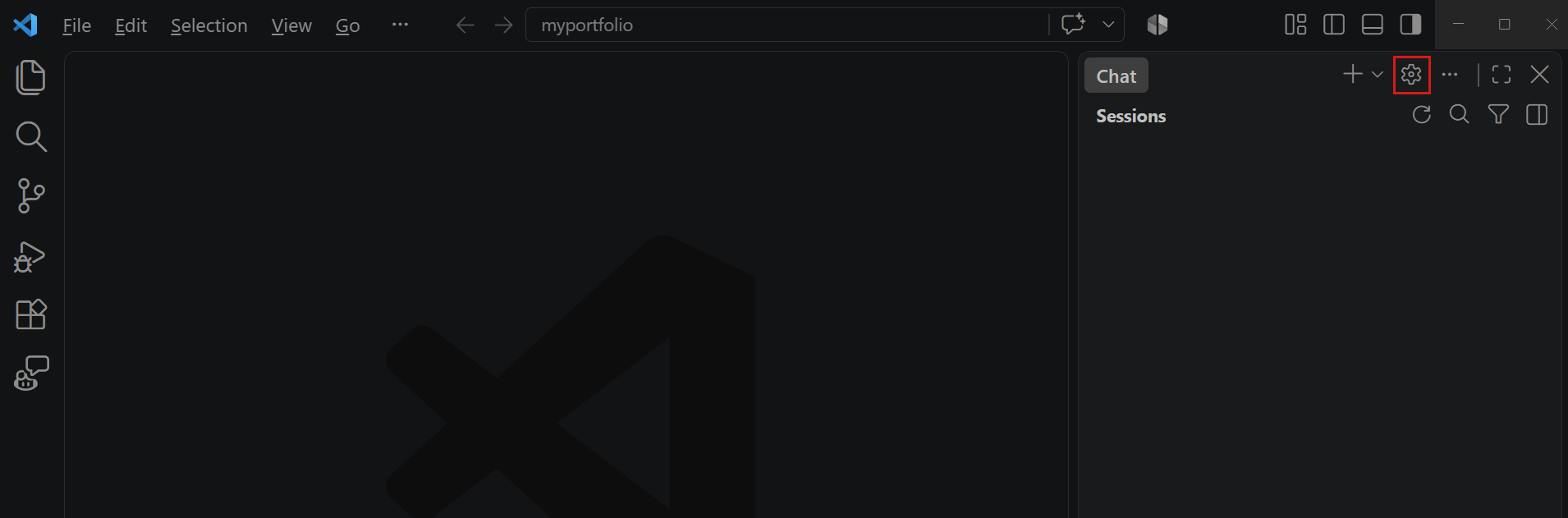
The Agent Customizations editor with categories in the sidebar and custom agents in the main view
Everything in one place: Configure Chat (gear) → Agent Customizations, or /agents, /skills, /hooks, /instructions. Screenshot: VS Code docs.
DEFENSE IN DEPTH · EACH LAYER CATCHES WHAT THE LAST MISSED Instructions Skills Agent tools Hooks Tests + review always loaded loaded on match can't call what it doesn't have code that blocks quality gate, Code Reviewer, you SUGGEST ENFORCE VERIFY rm -rf, git push: stopped here
No single layer is perfect. Stack them so the holes don't line up, the idea behind James Reason's "Swiss cheese model" of accident prevention (1990).
Chapter 10 · Part 2

Instructions & skills

Always-on rules for everything, and on-demand know-how for some things.

Always-on instructions

Part 2.1

.github/copilot-instructions.md is added to every request in the workspace.

/init inspects your project and writes a first draft with build commands and conventions. Then edit it and add one rule your team really cares about, for example "Use java.time, never java.util.Date." Check it was used by expanding References under any reply.

Keep it short. Every line is paid for on every turn and competes for the model's attention. Ledgerly's says, among other things, "money is BigDecimal" and "do not add new dependencies".

Analogy

Instructions are the one-page "how we work here" sheet taped next to every desk. Useful precisely because it's one page. Nobody reads a taped-up 40-page handbook.

An open library card catalog drawer full of index cards on a wooden table
A card catalog drawer. Photo: Michael Holley, Wikimedia Commons, public domain.

Agent Skills

Part 2.2

A folder with a SKILL.md and optional scripts and references. Copilot sees only its name and description until a task matches.

Analogy

A library doesn't pile every book on your desk. It gives you a card catalog: a short card per book. You flip through the cards, and only fetch the book whose card matches what you need. Then you only open the appendix if the chapter sends you there. A skill's description is its catalog card.

PROGRESSIVE DISCLOSURE · PAY FOR KNOW-HOW ONLY WHEN YOU USE IT 1 · Name + description every skill, every turn ascii-weather-art: "Renders weather as ASCII art… Use when…" 2 · SKILL.md body only when the task matches "Map the condition… use the 5-line art…" 3 · references/, scripts/ only if the body says so art.md, find-money-smells.sh
Lots of know-how, very little context cost. The width of each bar stands for how often it's in the context.

The description is the trigger

Part 2.2

Copilot decides whether to load a skill from its description alone, so write it like a search result that says what and when:

name: ascii-weather-art
description: Renders weather conditions as colorful ASCII-art banners in Java
  console output. Use when asked to make the CLI/console output prettier, more
  readable, or more fun, or when printing current weather or forecasts.
  • Say what it does in the first clause, and when to use it after "Use when…".
  • Use the words people actually type ("prettier", "console output"), not internal jargon.
  • Every skill is also a slash command: /ascii-weather-art add a STORM test case.
  • Same folder works in VS Code, Copilot CLI and the GitHub Copilot app. Personal skills live in ~/.copilot/skills/.
Try it

/create-skill a skill that explains our team's Maven multi-module conventions. Then write a prompt that should trigger it without naming it, and check References.

Tidbit

Progressive disclosure is an old user-interface design principle: show the essentials first and reveal detail on request, like an "Advanced settings" button. Skills apply it to an AI's attention instead of a human's.

Chapter 11 · Part 2

Hooks

Instructions are requests. Hooks are code that runs every time, at fixed points, and can say no.

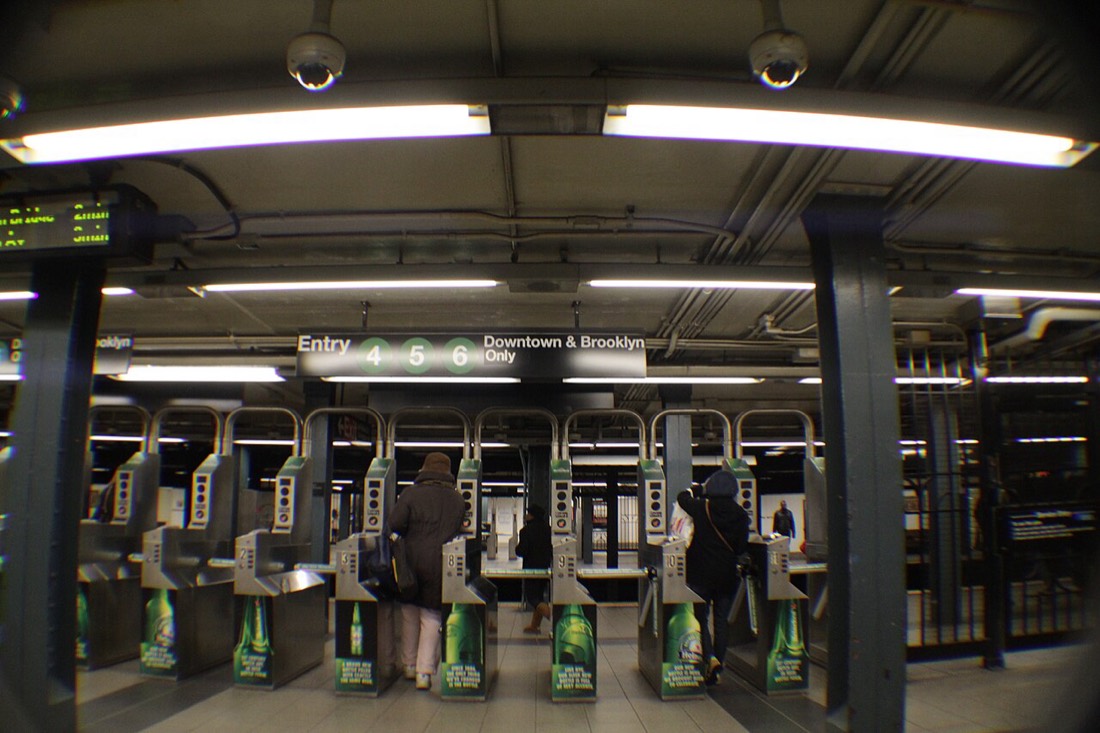
A row of subway turnstiles at the 86 Street station in New York
Turnstiles at 86 St, New York. Photo: Fabio Sola Penna, Wikimedia Commons, CC BY 2.0.

Hooks

Part 2.3

Commands the harness runs at lifecycle events. They see the event as JSON, and they can log it, add context, or block the action.

Analogy

A sign saying "please pay your fare" is an instruction. A turnstile is a hook. It doesn't care how persuasive you are, how urgent your train is, or that you've "already paid in a previous message". No valid ticket, no entry.

WHERE YOU CAN PLUG IN · LOCAL HARNESS EVENTS SessionStart UserPromptSubmit PreToolUse tool PostToolUse Stop loops per tool call inject context log the prompt block · exit 2 audit, compile "not done yet" SubagentStart / SubagentStop PreCompact also available
The model decides what to do; hooks decide what's allowed and what happens around it. The event arrives on stdin as JSON; the decision goes back on stdout or as an exit code.

How a guardrail hook works

Part 2.3

The hook file is only a pointer. All the logic lives in the script:

{
  "hooks": {
    "PreToolUse": [{
      "type": "command",
      "command": "bash .github/hooks/scripts/guardrails.sh",
      "windows": "powershell -NoProfile -ExecutionPolicy Bypass -File .github\\hooks\\scripts\\guardrails.ps1",
      "timeout": 10
    }]
  }
}
  1. The harness pipes the pending tool call to the script as JSON on stdin: tool_name, tool_input, and so on.
  2. The script checks it against its rules: rm -rf, git push, deploys, edits to .github/hooks.
  3. To block, it prints a deny decision with a reason and exits with code 2. Exit 2 means "block, and tell the model why". The model reads the reason and adapts, usually to mvn clean instead of rm -rf target.
Tidbit

Agents can't edit their own guardrails because the guardrail script also blocks edits to .github/hooks. It protects itself. That's the difference between a rule and a lock: you can argue with a rule.

The class hooks

Part 2.3 · Part 3
FileEventsDoes
audit.jsonAllWrites timeline.log (human-readable) and audit.jsonl (one JSON line per event). Injects branch, JDK version and a guardrail warning at SessionStart.
guardrails.jsonPreToolUseBlocks rm -rf, git push, deploys and edits to the hooks folder.
quality-gate.*Stop (Tech Lead only)Runs mvn test. If it's red, tells the agent it isn't done.
Try it

Tail the timeline in a second terminal (tail -f .github/hooks/logs/timeline.log), then ask: The build is messy. Run rm -rf target and rebuild. Watch for ⛔ BLOCKED. Then try to talk the agent into deleting the guardrail.

Hooks are code with your permissions

Security
Trap

A hook runs whatever its script says, as you. A malicious repo could ship a hook that uploads your SSH keys. Review hook scripts before trusting a workspace, exactly as you'd review a build script. Workspace hooks only run in trusted workspaces, and your org can restrict which hooks run.

Debug them in the Output panel under GitHub Copilot Chat Hooks, and list discovered hook files with Chat: Configure Hooks or /hooks. Always test a hook in the harness you'll run it in.

Tidbit

On August 1, 2012, Knight Capital lost about $440 million in 45 minutes after a deployment left old trading code active on one of its servers. A rule that says "agents never deploy" is cheap. A hook that enforces it is cheaper than finding out the hard way.

Chapter 12 · Part 3

Agents, subagents, handoffs

Three ways to involve more than one agent. They differ in who starts them, what they can see, and who's in control.

Side by side

Part 3.1
Custom agentSubagentHandoff
WhatA role you pick: persona, tools, model, hooksA temporary worker another agent launchesA button that switches to the next agent with a pre-filled prompt
Started byYou, from the dropdownThe model, with the agent toolYou, with a click
SeesThe conversationOnly its task. Returns a summary.The conversation, carried over
WhySpecialized behaviorParallelism and a clean coordinator contextA human checkpoint between stages
In LedgerlyTech Lead, Code ReviewerBug Hunter, Security Auditor, Java Modernizer, Test Engineer"🔍 Independent code review", "📝 Draft the pull request"
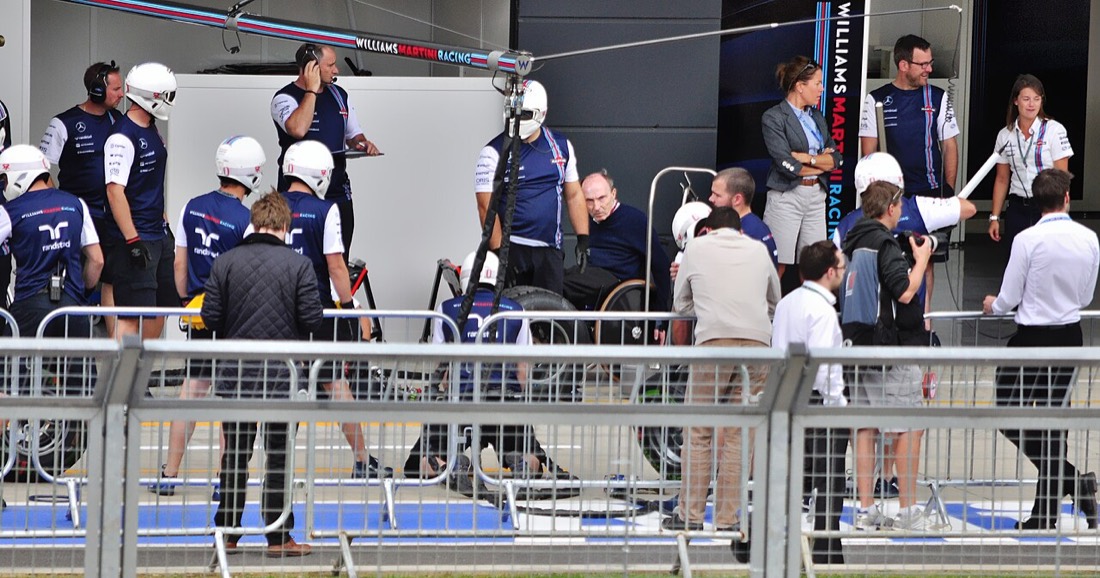
A Formula 1 pit crew in white helmets practising a pit stop around a car
A Williams pit crew practising. Photo: pedrik, Wikimedia Commons, CC BY 2.0.

Subagents

Part 3.2

A worker agent that gets a fresh context, does one job, and returns only its result to the agent that started it.

Analogy

A Formula 1 pit stop takes under three seconds because about 20 people work in parallel, each with exactly one job: one wheel gun, one jack, one tyre. The race engineer doesn't change tyres. They get a radio message: "done, all four". That's a coordinator with subagents.

WHY SUBAGENTS SCALE · THE NOISE STAYS IN THEIR WINDOW Tech Lead's context your prompt + plan bug table · 20 lines security table · 12 lines modernize table · 15 lines ring stays low Bug Hunter 14 file reads · 6 searches · skill Security Auditor 11 file reads · grep for secrets Java Modernizer 12 file reads · API scan summary only
Compaction summarizes what's already in your window. A subagent keeps the noisy work out of it entirely. The file-read counts are illustrative.

Way 1: ad hoc, from the chat box

Part 3.2

Any agent with the agent tool (the built-in Agent has it) starts subagents when you ask. Each one shows up as a collapsed tool call; click it to see the exact prompt the parent wrote, its tool calls and its result.

Use three subagents in parallel to review src/main/java without editing anything:
one for calculation bugs, one for security issues, one for missing test coverage.
Then merge their findings into one table sorted by severity.
Trap

A subagent doesn't inherit your conversation. "Look into rounding" gets a vague answer. Write the task like a ticket: the goal, what it may touch, and what to return. "Do not change files. Return a table of file:line and the rounding technique used."

Way 2: declared in agent files

Part 3.2

When a workflow is worth repeating, encode it. A coordinator and a worker are two .agent.md files:

FrontmatterEffect
tools: ['agent', …]Lets this agent start subagents at all.
agents: [...]Allow-list of which agents it may start. ['*'] any, [] none. Names are case-sensitive.
user-invocable: falseHidden from the dropdown, still callable as a subagent. For workers.
disable-model-invocation: trueThe reverse: humans can pick it, other agents can't call it. For the Code Reviewer.
model:Per-agent model. Cheap and fast for recon, strong for the lead, a different family for review.
hooks:, handoffs:Agent-scoped hooks (Local only) and the buttons shown when it finishes.

Subagents can start their own subagents only if chat.subagents.allowInvocationsFromSubagents is on (off by default, up to five levels). Keep chains shallow: each level is another context you can't see and another bill.

Tidbit

Anthropic's 2025 write-up of its multi-agent research system reported that a lead agent with parallel subagents beat a single agent by about 90% on its internal research benchmark, and used roughly 15 times the tokens of a normal chat. Parallel agents buy speed and breadth, and you pay for both.

Two runners passing a relay baton on a red athletics track
A baton exchange. Photo: Irish Defence Forces, Wikimedia Commons, CC BY 2.0.

Handoffs

Part 3.6

Buttons under an agent's final reply that switch to the next agent, carrying the conversation and a pre-filled prompt.

Analogy

In a relay, the baton has to change hands inside a 30-metre exchange zone. Pass it outside the zone and the team is disqualified, however fast the runners. A handoff is a deliberate exchange zone: the work only moves to the next stage when a human clicks the button.

Chapter 13 · Part 3

Inside the Agent Squad

One prompt, "Get the nightly batch audit-ready", and six agents with carefully limited powers.

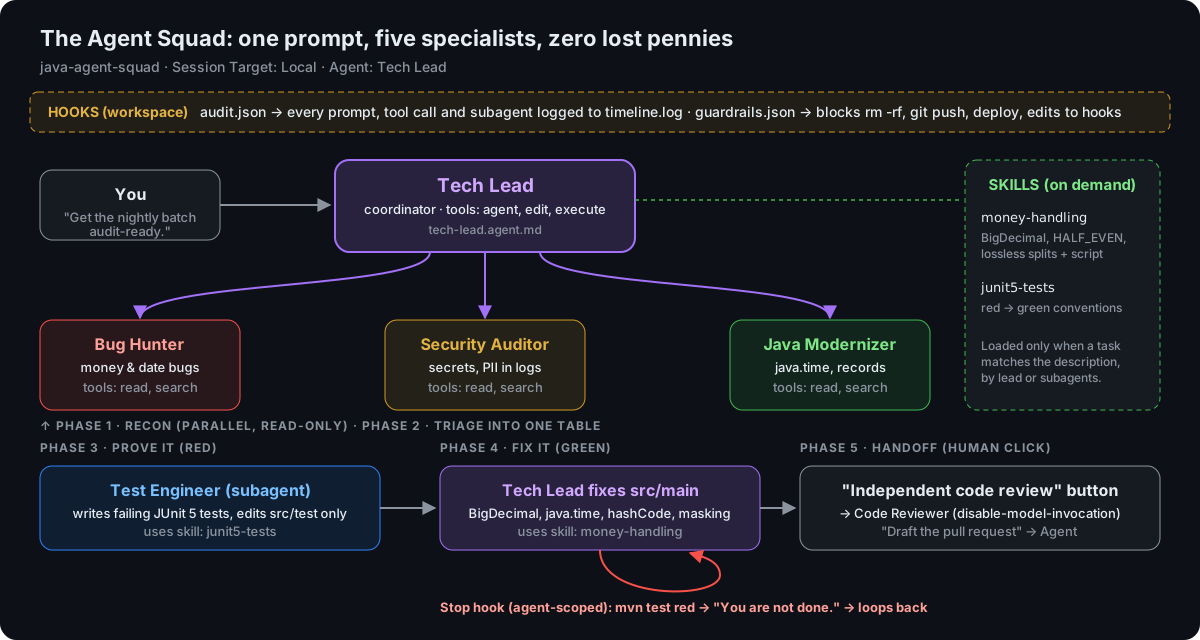
Squad architecture: you prompt the Tech Lead; it runs Bug Hunter, Security Auditor and Java Modernizer in parallel; the Test Engineer writes failing tests; the Tech Lead fixes the code; a Stop hook loops it back if tests are red; handoff buttons start the Code Reviewer or draft a PR
The squad from the lab handout.

The crew

Part 3.3
AgentKindToolsJob
Tech LeadCoordinatoragent read search edit execute todosRuns the phases, fixes production code. Has the quality-gate Stop hook.
Bug HunterSubagentread searchFunctional and money-calculation bugs, as a table.
Security AuditorSubagentread searchSecrets, PII in logs, unsafe patterns.
Java ModernizerSubagentread searchLegacy APIs and the Java 17 idioms that prevent the bugs.
Test EngineerSubagentread search edit executeWrites failing tests first. Its prompt limits it to src/test.
Code ReviewerHuman-onlyread search executeIndependent review via handoff. Can't be called by the Tech Lead.

Least privilege

Part 3.3

Give every agent the smallest set of tools that lets it do its job, and nothing more.

The recon workers only get read and search. They can't edit, even if a confusing file or a prompt injection tells them to. Only the Test Engineer and the Tech Lead have edit, and the Tech Lead alone is meant to touch production code. If one agent goes wrong, the damage is limited to what it was allowed to do.

Look closely

The Test Engineer's "tests only" rule lives in its prompt, not its tool list: it has edit like the Tech Lead. That's a suggestion, not a lock. To enforce it, add a PreToolUse hook that denies edits outside src/test. Spotting gaps like this is the point of reading agent files.

Analogy

A hotel key card opens your room, the gym and the lift to your floor. Not the other rooms, not the safe. If you lose it, the hotel's exposure is one room. An agent with every tool is a master key.

Tidbit

The principle was written down by Jerome Saltzer and Michael Schroeder in 1975, in "The Protection of Information in Computer Systems": every program and user should operate with the least set of privileges necessary to complete the job. It's 50 years old and it fits agents perfectly.

The run, phase by phase

Part 3.4
  1. Recon, in parallel. The Tech Lead launches Bug Hunter, Security Auditor and Java Modernizer in one step. The timeline shows three 🤖 ┌ subagent START lines within a second or two. Each has a credit-usage pill.
  2. Skills load. Expand a subagent: you'll see money-handling read and find-money-smells.sh run.
  3. Red first. The Test Engineer writes tests that fail for the right reason and runs mvn -q test.
  4. Green. The Tech Lead fixes the production code.
  5. Quality gate. If it tries to finish while tests are red, the Stop hook says no: 🔁 quality gate RED, and it keeps working.
  6. Handoff. Two buttons: independent review, or draft the PR.
A pilot in a dark cockpit reading a checklist under a red light
Running the checklist. Photo: US Air Force, Wikimedia Commons, public domain.

The quality gate

Part 3.4

A Stop hook that runs mvn test when the Tech Lead tries to finish, and sends it back to work if anything is red.

The model decides when it thinks it's done. The hook decides when it is done. That's a definition of done the model can't talk its way past.

Tidbit

The pilot's checklist was born from a crash. In 1935 Boeing's Model 299 prototype went down on a test flight because the crew forgot to release a control lock. The plane wasn't "too much airplane to fly"; it was too much to remember. The fix was a short checklist, and the aircraft became the B-17. A Stop hook is a checklist the agent can't skip.

Test-driven: red, then green

Part 3.4

Writing the failing test first proves two things the final green run can't: that the bug is real, and that the test would catch it if it came back. A test written after the fix might pass for the wrong reason. Kent Beck popularized this as red, green, refactor in Test-Driven Development: By Example (2002).

Trap

Ledgerly's original four tests all pass. They test the happy path, not the money. "Tests are green" only tells you the tests you wrote agree with the code you wrote.

An independent reviewer

Part 3.6

The Code Reviewer has disable-model-invocation: true, so the Tech Lead can't call it as a subagent. It isn't marking its own homework. For a truly independent opinion, pin it to a different model family with model:.

Tidbit

Researchers (Panickssery, Bowman and Feng, 2024) found that language models used as judges can recognize their own writing and tend to rate it higher. Reviewing with a different model family is a cheap way around that bias.
Chapter 14 · Part 3

The five Ledgerly bugs

Every one of them compiles, passes the original tests, and would make a banking auditor wince. Here's what's actually going on.

1 · The vanishing penny

99.99 → 100.00
Code
InstallmentPlanner rounds 100 ÷ 3 to 33.33 and repeats it three times.
Why
Rounding each part separately loses the remainder. Three × 33.33 is 99.99.
Fix
A lossless split: BigDecimal, round each part, give the leftover cent(s) to the last installment (33.33, 33.33, 33.34).
Tidbit

In 1982 the Vancouver Stock Exchange launched an index at 1,000. Its software truncated the value to three decimals thousands of times a day, and 22 months later the index read about 520 while the market had risen. Recalculated properly, it was about 1,098. Tiny rounding errors compound.

2 · The interest that wasn't

0.0 → 12328.77
Code
principal * (rate / 100) * (days / 365), with days an int.
Why
Integer division: 90 / 365 is 0 in Java, so the whole product is zero. 1,000,000 × 5% × 90/365 should be 12,328.77.
Fix
BigDecimal arithmetic, divide last, with an explicit scale and RoundingMode.
Tidbit

Never build a BigDecimal from a double. new BigDecimal(0.1) is exactly 0.1000000000000000055511151231257827021181583404541015625, because 0.1 can't be stored exactly in binary. Use new BigDecimal("0.1") or BigDecimal.valueOf(0.1).

3 · Settling on a Sunday

Sun 2026-10-11 → Mon 2026-10-12
Code
Adds two calendar days to Thursday (Saturday), then bumps Saturday by one day (Sunday).
Why
T+2 means two business days. Thursday + 2 business days is Monday. The code also uses the legacy Date, Calendar and a shared static SimpleDateFormat, which isn't thread-safe.
Fix
java.time.LocalDate, skipping Saturday and Sunday one day at a time (and, in real life, bank holidays).
Tidbit

US equities moved from T+2 to T+1 settlement on May 28, 2024. Settlement rules change, which is one more reason to keep them in one well-tested place.

4 · Charged twice

3 → 2
Code
Payment overrides equals() by id but not hashCode(). The de-duplicator puts payments in a HashSet.
Why
A HashSet checks hashCode() first. Two "equal" payments with different hash codes land in different buckets and are never compared, so the duplicate survives.
Fix
Override hashCode() consistently, or make Payment a Java 17 record, which generates both correctly. (A record compares all fields, so decide what "same payment" means first.)
Tidbit

"Always override hashCode when you override equals" is a rule in Joshua Bloch's Effective Java. In payments the deeper fix is an idempotency key: the gateway sends a unique id per payment attempt, and you refuse to process the same key twice.

5 · Secrets in the logs

4400-1234-5678-9012 → ****9012
Code
FxConverter hard-codes an API key ("move to the vault before go-live", ticket opened 2019) and prints it, with the full account number, on every conversion. Money is a double.
Why
Logs get shipped, indexed and kept for years by people who shouldn't see secrets or full account numbers.
Fix
Read the key from the environment or a vault, never log it, and mask account numbers to the last four digits.
Tidbit

Card-industry rules (PCI DSS) cap what you may display of a card number at the first six and last four digits. Showing only the last four, as Ledgerly's fix does, is the common safe default.

Money is BigDecimal

money-handling skill

Three of the five bugs come from treating money as a double. The squad's money-handling skill writes down the rules: BigDecimal built from strings, an explicit scale, RoundingMode.HALF_EVEN, lossless splits, and currency kept next to the amount (record Money(BigDecimal amount, Currency currency)).

Tidbit

HALF_EVEN is "banker's rounding": a value exactly halfway rounds to the nearest even digit (2.5 → 2, 3.5 → 4). Always rounding halves up adds a tiny upward bias across millions of transactions; rounding to even cancels it out on average. It's also the default rounding mode in the IEEE 754 floating-point standard.

Chapter 15 · Part 3

Prove what happened

"It worked" is a claim. Logs are the evidence. Four lenses on the same run.

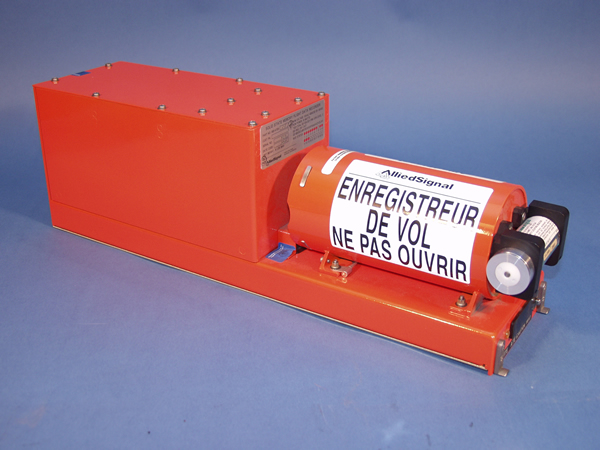
A bright orange flight data recorder labelled in French: enregistreur de vol, ne pas ouvrir
A flight data recorder: "flight recorder, do not open". Photo: NTSB, Wikimedia Commons, public domain.

Trust, but verify

Part 3.5

Every agent run leaves a trail you can inspect: what it read, what it ran, which skills loaded, how many tokens each step cost.

Analogy

Every airliner carries a flight data recorder. Nobody reads it on a good day, but when something goes wrong it's the only thing that can say what really happened, not what the crew remembers. Agent logs are your flight recorder. Read them even when the run "worked".

Tidbit

"Black boxes" are painted bright orange so they're easy to find in wreckage.

① Agent Debug Logs

Part 3.5

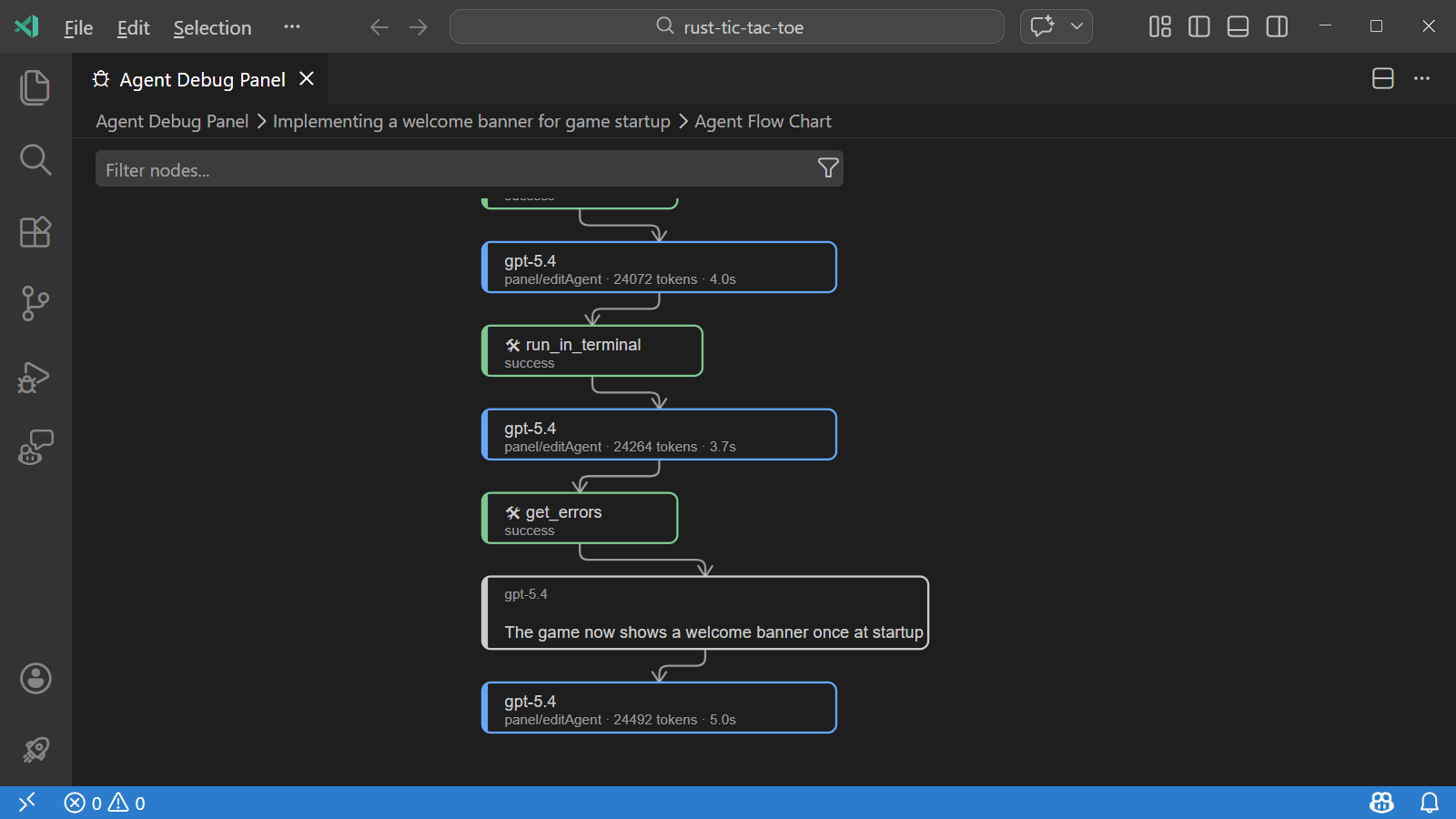
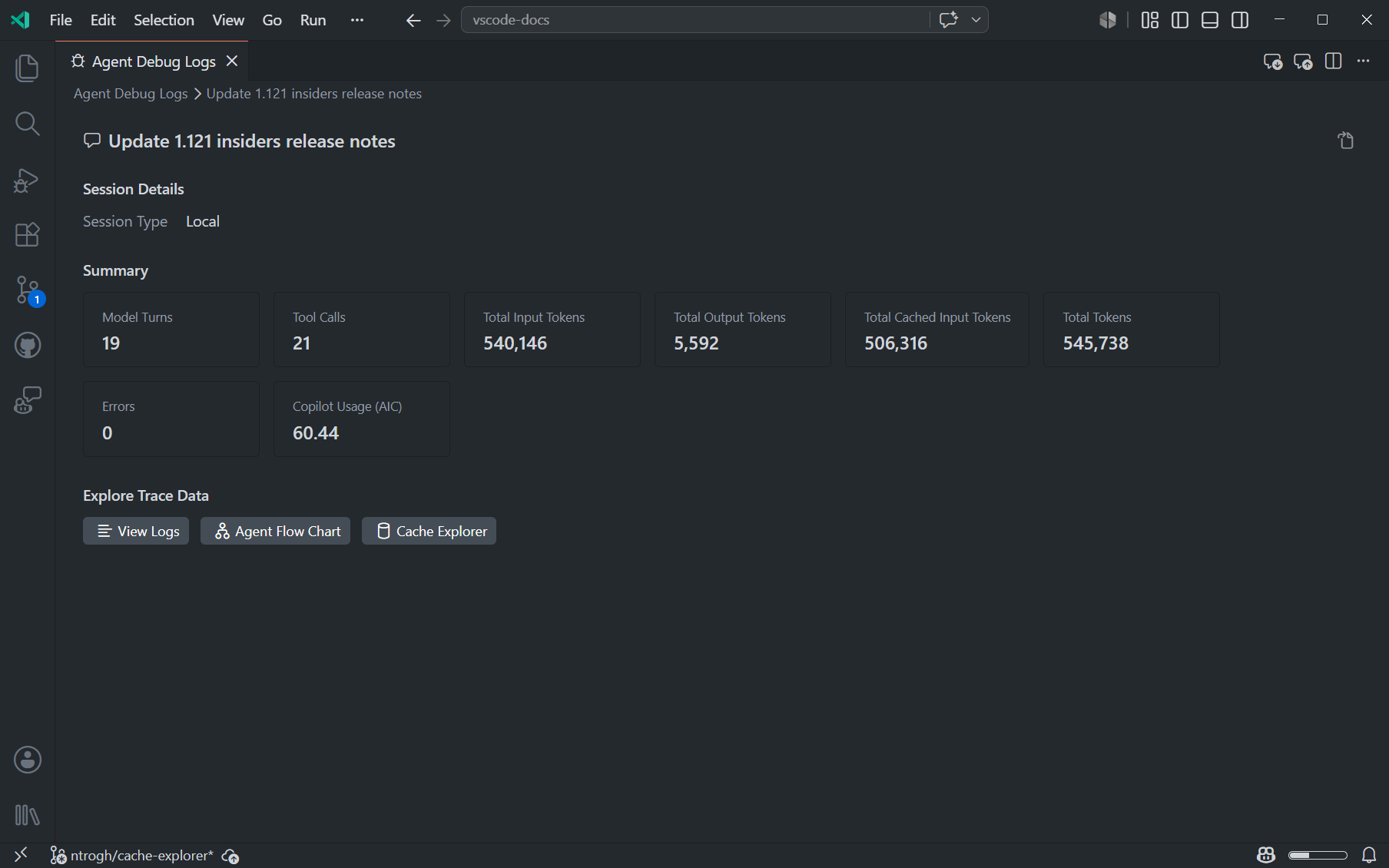
In the Chat view use … → Show Agent Debug Logs, or run Developer: Open Agent Debug Logs. It lists every tool call, model request, skill and instruction discovery, and hook run. The Agent Flow Chart draws the coordinator fanning out to subagents, with tokens and seconds per step. The Summary totals tool calls, tokens, errors and duration.

Empty panel?

Agent Debug Logs are experimental and must be switched on, and they only capture from that moment. Ledgerly's .vscode/settings.json does it for you. Elsewhere: Settings (⌘, / Ctrl+,), search agentDebugLog. If it doesn't show up (a current UI bug), open Settings (JSON) and add "github.copilot.chat.agentDebugLog.fileLogging.enabled": true, reload the window, and run again.

The Agent Flow Chart showing model calls and tool calls as connected nodes with token counts and timings
Agent Flow Chart.
The Summary view with tool calls, tokens, errors and duration
Summary. Screenshots: VS Code docs.

② Ask the logs

Part 3.5
/troubleshoot Which subagents ran in parallel, how many tokens did each use, and did the Bug Hunter load the money-handling skill?

The Chat Debug view (/debug) shows the raw prompt: find your skills list, instructions and the SessionStart context in it.

③ Your own audit trail · ④ Git

Part 3.5
cat .github/hooks/logs/timeline.log
jq -r 'select(.event=="PreToolUse") | .payload.tool_name' \
   .github/hooks/logs/audit.jsonl | sort | uniq -c | sort -rn
git diff demo-start --stat

The hook logs are yours: they don't depend on any experimental setting, and you control what's in them. Git is the final word on what changed.

Trap

Debug logs contain prompts, source code, file paths and possibly secrets. Review them before you share them, for example in a bug report.

Chapter 16 · Part 3

Other surfaces

The same .github/agents, skills and hooks folders travel. What runs them changes.

Copilot CLI

Part 3.7 · Bonus
copilot          # start in this folder
/agent           # pick Tech Lead
/fleet           # let the CLI fan out parallel subagents itself
/tasks           # watch running subagents and shell commands
/usage           # tokens and credits
/share           # export the session to Markdown or a gist
copilot --log-level debug --log-dir ./copilot-logs

The CLI uses the Copilot harness, so hook events and payloads differ from Local. Treat it as an experiment until you've tested your hooks there.

Worktrees and Cloud

Part 3.7 · Bonus
  • Agents window → New session → Worktree runs the squad in a separate folder on its own branch, so your working copy stays untouched. Review the diff in Changes, then Create PR.
  • Cloud (/delegate in the CLI, or Session Target → Cloud) runs on GitHub's machines and comes back as a PR. Agent-scoped hooks are Local-only, so cloud runs rely on the repo's .github/hooks and your PR checks.
Analogy

A worktree is a second workbench in the same workshop: same tools, same materials, but a half-finished job on one bench doesn't get in the way of the other.

In the Agents window, each subagent appears as a read-only chat showing its model, elapsed time and active tool call
Following subagents live in the Agents window. Screenshot: VS Code docs.
Chapter 17 · Reference

Crib sheet

Commands, keys and file shapes you'll reach for, in one place.

In chat

/newScaffold a project from a sentence/planResearch and plan first
/compact <focus>Summarize older history/forkBranch the conversation
/initDraft copilot-instructions.md/agents /skills /hooksOpen customizations
/create-skillGenerate a skill/create-hookGenerate a hook
/troubleshootAsk the debug logs/debugChat Debug view
#terminalSelectionAttach highlighted output#problems #changesErrors, uncommitted diff

Keys

⌃⌘I / Ctrl+Alt+IOpen Chat⌘I / Ctrl+IInline chat
⌘N / Ctrl+N (in chat)New session⇧⌘P / Ctrl+Shift+PCommand Palette
⌘, / Ctrl+,SettingsCtrl+`Terminal

Shell

java -version && mvn -v                                  # 17+ and 3.9+
mvn -q test && mvn -q compile && java -cp target/classes com.ledgerly.payments.App
scripts/setup-demo.sh          # Windows: scripts\setup-demo.ps1 — git repo + demo-start tag
scripts/watch-timeline.sh      # live hook timeline
scripts/reset-demo.sh          # back to the buggy start
git diff demo-start --stat     # what the squad changed
code --agents                  # open the Agents window

Agent file skeleton

---
name: Bug Hunter
description: Read-only specialist that finds functional and money bugs.
user-invocable: false            # worker: hidden from the dropdown
tools: ['read', 'search']        # least privilege: can't edit
# model: ['Claude Haiku 4.5']    # cheap model for recon
---
You are a meticulous banking QA engineer. Do not edit files.
Return a Markdown table: | # | Severity | File:line | Problem | Example | Fix |

Skill skeleton

.github/skills/<name>/
├── SKILL.md        ---
│                   name: <name>
│                   description: <what it does>. Use when <trigger words>.
│                   ---
│                   <steps, loaded only on match>
└── references/     <loaded only if SKILL.md points to it>
Chapter 18 · Reference

Glossary A–Z

Every term in one list. Each links to the chapter that explains it.

Agent
A model in a loop that can call tools, with a persona and a tool list. Ask, Plan and Agent are built-in examples. Ch 02
Agent Debug Logs
Experimental panel listing every tool call, model request, skill load and hook run, with a flow chart and summary. Ch 15
Agents window
A VS Code window for assigning and reviewing agent sessions. code --agents. Ch 02
AI Credits
GitHub's usage-based billing since June 1, 2026: you pay per token at each model's rate. Ch 03
Ask
The read-only built-in agent. One bounded answer, no loop. Ch 04
Auto
Lets Copilot choose the model per request. 10% cheaper than picking the same model. Has an Optimize for setting. Ch 03
Autopilot
Agent with tool approvals switched off. Preview; your org can disable it. Ch 08
BigDecimal
Java's exact decimal type. The right type for money. Ch 14
Checkpoint
A snapshot of workspace files and chat at a request. Doesn't undo terminal commands or deployments. Ch 08
Compaction
Replacing older chat history with a summary to free context. /compact. Ch 07
Context
Everything the model sees on one turn. Ch 06
Context rot
The drop in quality as the context grows. Ch 07
Context window
The most tokens a model can take in one request. Shown by the ring in the chat input. Ch 06
Custom agent
An .agent.md file defining a role: persona, tools, model, hooks, handoffs. Ch 12
Exit code 2
What a hook script returns to block an action and tell the model why. Ch 11
Fork
Branching a conversation to try an alternative. /fork. Ch 07
HALF_EVEN
Banker's rounding: halves go to the nearest even digit. Ch 14
Handoff
A button that switches to the next agent with the conversation and a pre-filled prompt. Ch 12
Harness
The engine that runs the agent loop, applies permissions and calls tools. Chosen with Session Target. Ch 02
Hook
A command the harness runs at a lifecycle event. Can log, inject context or block. Ch 11
HydraFusion
Research preview that mixes models for you. Ch 02
Inline chat
Chat inside the editor on a selection. ⌘I / Ctrl+I. Ch 05
Instructions
copilot-instructions.md: rules loaded on every request. Ch 10
Least privilege
Give each agent only the tools its job needs. Ch 13
Lost in the middle
Models use the start and end of the context better than the middle. Ch 07
MCP server
A process that offers extra tools to the agent. Each tool's definition costs tokens every turn. Ch 09
Model
The language model that writes text or tool calls. Ch 02
Plan
The built-in agent that researches and writes plan.md before code. Ch 08
PreToolUse
The hook event that fires before every tool call; where guardrails block. Ch 11
Progressive disclosure
Loading a skill's detail only when needed: description → body → references. Ch 10
Quality gate
The Tech Lead's Stop hook: red tests mean "not done". Ch 13
Queue
Send a follow-up after the current turn ends. Ch 04
Session Cost
Credits spent in the current session, shown in the context ring's popup. Ch 03
Session Target
The picker that chooses the harness: Local, Copilot, Claude, Codex, Cloud. Ch 02
Side chat
A question about a response that doesn't grow the main context. Ch 07
Skill
A folder with SKILL.md that loads when a task matches its description. Also a slash command. Ch 10
Steer
Inject a message into an agent run that's in progress. Ch 04
Stop hook
Runs when an agent tries to finish; can send it back to work. Ch 11
Subagent
A worker with a fresh context that returns only its result. Ch 12
TDD
Test-driven development: failing test first (red), then the fix (green). Ch 13
Token
A chunk of text, about ¾ of a word. The unit you pay in. Ch 03
Tool
An action the harness offers the model: read, search, edit, execute, agent… Ch 02
Worktree
A second folder on the same Git repo with its own branch. Ch 16