Companion to the CG AI course wiki · GitHub Copilot in VS Code · October 2026

Agents & MCP Field Guide

The ideas behind every module of the course, explained properly: how much autonomy to hand an agent, how to teach it your team's rules, how a squad of agents shares work, and how the Model Context Protocol connects all of it to real systems without handing over the keys.

VS Code 1.140+Node 24 LTSMCP 2025-11-25 + 2026-07-28Modules 0–4
Chapters
  1. Ground school
  2. Start here
  3. Harness, agent, model
  4. Tokens & AI Credits
  5. Part A · Autonomy & context
  6. The autonomy ladder
  7. Context & context rot
  8. Plan, checkpoints, Git
  9. Part B · Teach your team
  10. Where guidance lives
  11. Skills
  12. Hooks
  13. Part C · Agent teams
  14. Agents, subagents, handoffs
  15. Prove what happened
  16. Local vs cloud agents
  17. Part D · MCP
  18. What MCP is
  19. One protocol, many transports
  20. Wiring servers into VS Code
  21. How the model picks a tool
  22. The security boundary
  23. Designing great tools
  24. Resources, prompts, elicitation
  25. Remote servers & sandboxing
  26. Inspector & testing
  27. MCP in 2026
  28. Reference
  29. Crib sheet
  30. Glossary A–Z
Chapter 01 · Ground school

Start here

What the course covers, in what order, and the one question every chapter keeps asking.

The one question

Whole course

How much control should I hand to the AI for this task, and which controls should I never hand over?

Copilot can now edit dozens of files, run your build, start helpers that work in parallel, call your databases through MCP and open a pull request. Every one of those powers is optional. The skill is picking the right amount for each job, and writing down the rules that hold however much you hand over.

Prompts guide. Hooks and servers enforce.

The course on one screen

Wiki modules

Each module adds a layer. Every lab in the course wiki has a guided Part A and a less-guided Part B with hints. This guide explains the why behind both.

0Orientation~1 hour

The timeline from autocomplete to agents, the chat symbols, AI Credits, and local models.

Start with .11 →
1Instructionslabs .2 – 1.3

Modes, repository instructions, enforcing standards in PRs, and a first MCP server (GitHub).

Rules the repo carries for you.
2Agents, skills, hookslabs 2.01 – 2.15

An agent team builds a telemetry dashboard. Skills, AGENTS.md, a self-healing build hook, the cloud agent.

Start with 2.01 →
3MCP fundamentalslabs 3.00 – 3.12

Hand-written JSON-RPC, stdio vs HTTP, the Inspector, and a raw-SQL tool you exploit and then fix.

Start with 3.00 →
4Advanced MCPlabs 4.00 – 4.05

Resources and prompts, tool design, elicitation, remote servers with auth, testing in CI.

Start with 4.00 →
★Capstones2.15 · 4.06

Ship a feature with your own agent team, then give that team a fleet-telemetry MCP server.

Capstone 4.06 →

The two codebases

Modules 2–4
ProjectWhat it isUsed in
jd-dashboardA React + Vite dashboard of simulated farm-equipment telemetry: engine temperature, fuel, GPS, alerts. Built by a team of four custom agents.Module 2, capstone 4.06
mcp/ (service-db)A Node project with a SQLite service inventory. You write MCP servers for it by hand, then with the official v2 SDK.Modules 3 and 4
Setup trap

Use one Node version (24 LTS, or at least 22.19) for everything. Native modules like better-sqlite3 are compiled for the Node that installed them; if VS Code launches your server with a different Node you'll see ERR_DLOPEN_FAILED.

Chapter 02 · Ground school

Harness, agent, model

Three separate dials that people blur into one word, "Copilot". Keeping them apart explains most surprises.

The three dials

Module 0

The model is the brain. The agent is the role it plays. The harness is the engine that runs the loop, applies permissions and calls tools.

  • Model: a specific model, or Auto, which picks per request and is 10% cheaper.
  • Agent: Ask, Plan, Agent, or a custom agent such as the course's Orchestrator. An agent is a persona plus a tool list plus, optionally, a model and hooks.
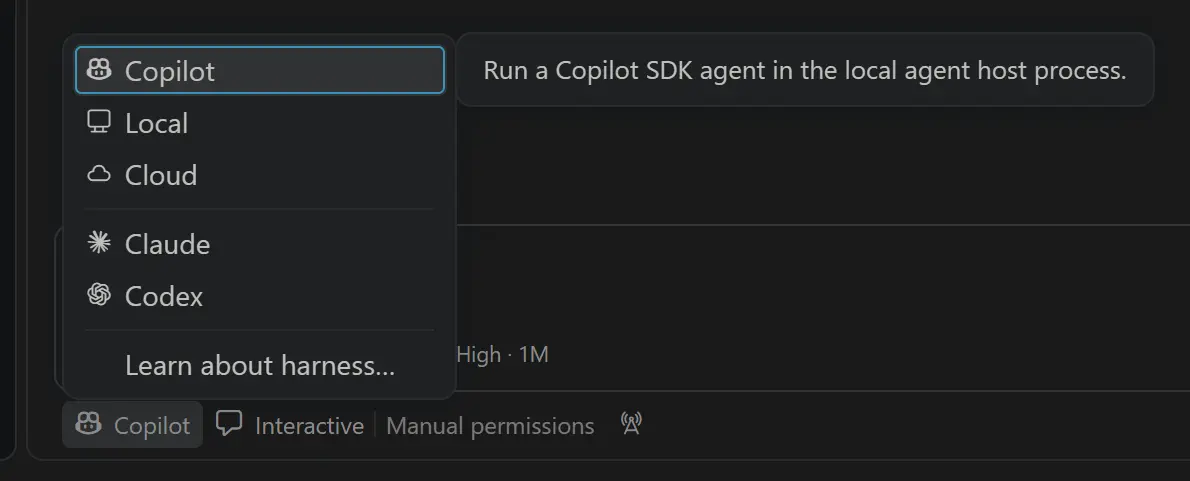
  • Harness, chosen with Session Target: Local (VS Code's own loop, used in most labs), Copilot (the Copilot CLI engine), Claude, Codex, and Cloud (runs remotely, returns a PR).
The Session Target picker listing Copilot, Local, Cloud, Claude and Codex
Session Target chooses the harness. Changing the model doesn't change it. Screenshot: VS Code release notes.

The agent loop

Foundations

A model on its own only writes text. An agent works because the harness offers the model a menu of tools (read, search, edit, execute, start a subagent, and every tool from your MCP servers). When the model replies with a tool request, the harness checks the rules, runs it, and feeds the result back. The loop repeats until the model answers in plain text.

You type a prompt HARNESS assembles context every turn loops until the model stops hooks · PreToolUse approvals you allow or deny MODEL writes text or a tool call TOOLS built-in · MCP servers context tool call if allowed result
The model never touches your disk or your database. Every action is a request the harness can check, log, ask you about, or block. MCP servers plug in on the right, as more tools.

Why the harness matters

Module 2

Hooks, tool names and some settings are harness-specific. A Local hook uses events like PostToolUse and fields like tool_name; the Copilot harness reads the same .github/hooks folder but uses Copilot CLI's camelCase events and payloads. That's why the hook labs pin Session Target → Local.

Analogy

The model is a brilliant contractor who can only talk. The harness is the site office: it hands out the tools, keeps the sign-in sheet and enforces site rules. The agent is the job title on the badge. Move to a different site office and the rules change, even with the same contractor.

The Agents window, and weekly releases

Module 0

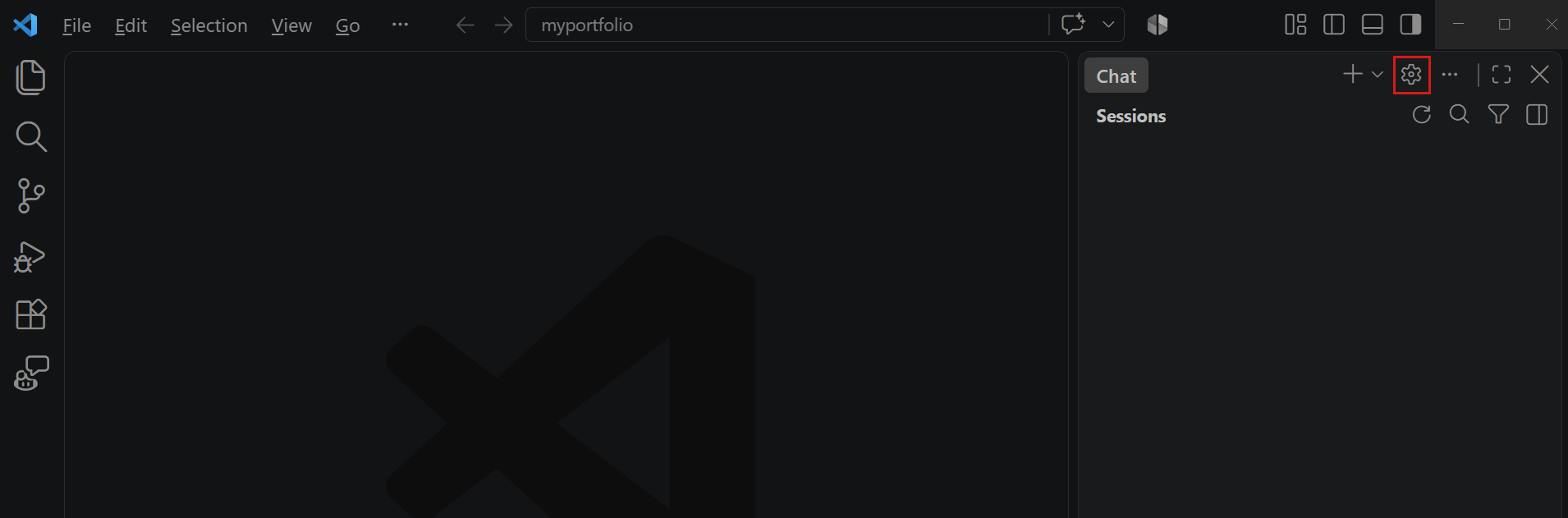
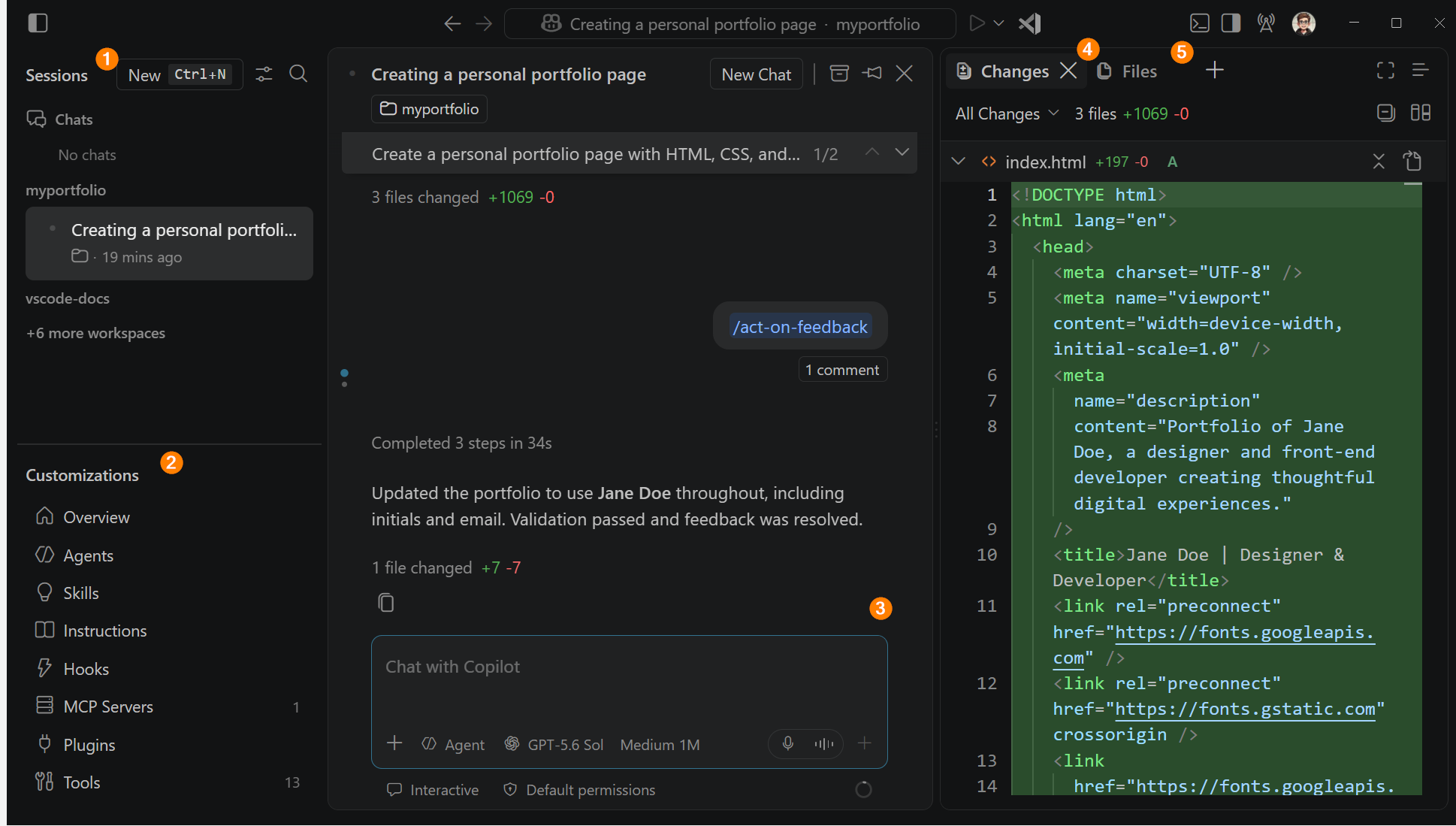
The Agents window (Stable since 1.120, May 2026) is built for assigning and reviewing many agent sessions: worktrees, Dev Containers, scheduled automations, a Changes panel and Create PR. VS Code has shipped weekly since 1.111 (March 2026), so screens drift fast. When a menu has moved, search the Command Palette.

Tidbit

Edit mode was deprecated in 1.110 and then removed. Ask, Plan and Agent are themselves just custom agents with different tool lists. If you want a "constrained editor", you write one.

The Agents window with sessions, chat, changes and files panels annotated
The Agents window. Screenshot: VS Code docs.
Chapter 03 · Ground school

Tokens & AI Credits

Since June 1, 2026 you pay for what the model reads and writes, not for how many times you press Enter.

A taxi meter on a car dashboard in Japan
A taxi meter. Photo: Wikimedia Commons, public domain.

Tokens and credits

.19

1 AI credit = $0.01. Each request is metered by input, cached input and output tokens, at the price of the model that handled it.

Analogy

The old premium request was a bus ticket: one fare per ride. AI Credits is a taxi meter: it runs for the whole trip. A 40-step agent loop that rereads the same five files is a long detour.

What drives cost

.19
  • The whole context is re-sent every step. Caching makes repeats cheaper, not free.
  • Tool results pile up. File reads, test logs and big MCP results outweigh what you typed.
  • Every enabled tool costs tokens every turn. An MCP server with 40 tools you never use isn't free.
  • Subagents multiply. Each has its own context and its own bill.
PlanPriceCredits / month
Pro$101,500
Pro+$397,000
Max$10020,000
Business · Enterpriseper seat1,900 · 3,900 per user, pooled

Code completions and Next Edit Suggestions don't use credits. Check the live price list before relying on numbers.

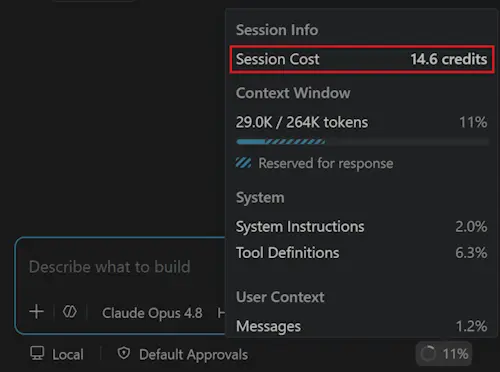
The session info popup showing Session Cost and context usage
Click the context ring for Session Cost.
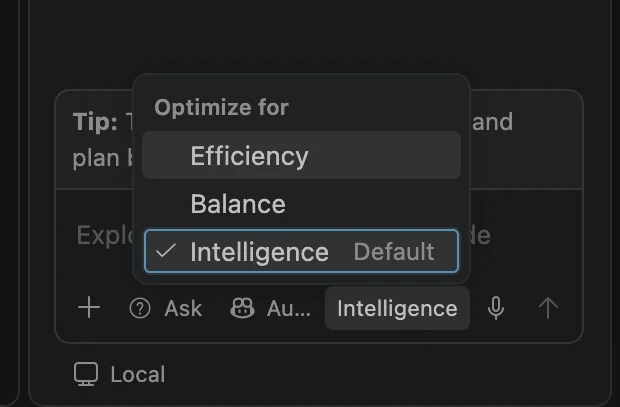
The Auto model Optimize for menu
Auto → Optimize for. Screenshots: VS Code release notes.
Trap

Long agent loops with a big model add up fast. In the course's worked example, one 30-step session costs about 160 credits on Opus versus about 37 on a lightweight model. Give read-only subagents a cheap model:, and start a fresh chat per task.

Chapter 04 · Part A

The autonomy ladder

Each rung buys speed with tokens and trust. Choosing the lowest rung that gets the job done is the skill.

A small red learner car with an L plate
An L plate: capable but supervised. Photo: TudorTulok, Wikimedia Commons, CC0.

Autonomy is a dial

Module 0 · .2

Each rung gives the AI more freedom to act without asking you, and needs more guardrails to be safe.

Analogy

Ask is a passenger giving directions. Agent is a learner driver with you beside them, approving each turn onto a main road. Autopilot is letting them drive alone. Hooks, checkpoints and server-side guardrails are the brakes you fit first.

#RungWhat it doesUse it when
1AskRead-only tools. One bounded answer.Explaining, exploring, one-shot answers.
2PlanResearches, asks clarifying questions, writes a plan.The change is risky or fuzzy.
3AgentEdits, runs commands, calls MCP tools, fixes its own mistakes. You approve tools.Multi-step work you can verify.
4AutopilotAgent with approvals switched off.Hooks and checkpoints have your back.
5Agent teamA coordinator plus least-privilege specialists, some in parallel.Big tasks with separable parts.
6Cloud agentRuns on GitHub's machines, returns a PR.Well-specified chores you'll review anyway.

Is Agent overkill?

Discussion

An Agent turn can run 10 to 40 tool calls. Under token billing, Ask with good context is often genuinely cheaper. Reach for Agent when the work needs doing, not just knowing.

More autonomy is not always better.

Tidbit

A 2025 METR study measured 16 experienced open-source developers as 19% slower on real tasks with AI tools, while they believed they'd been about 20% faster. Measure, don't assume.

Chapter 05 · Part A

Context & context rot

The model has no memory between calls. Everything it "knows" is whatever the harness packed into this one request, and more isn't better.

The context window

.12 · 2.04

The context is everything the model sees on a turn. The window is the most it can hold, in tokens.

A fresh chat doesn't know your other chat. A subagent doesn't know its parent's history. An MCP server's tool descriptions are in every request; its results pile up as the session runs. If something must survive, write it somewhere that gets loaded: instructions, a skill, a plan file.

Analogy

The context window is a desk, not a filing cabinet. A bigger desk lets you spread out more papers, but pile on enough old drafts and stack traces and you start working from the wrong page.

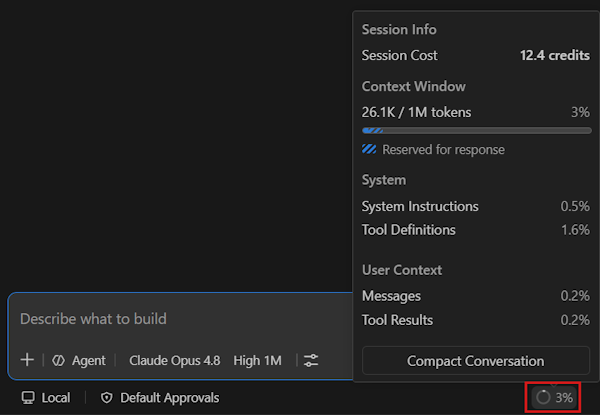
The context window popup with Session Cost and usage breakdown
The context ring's popup.
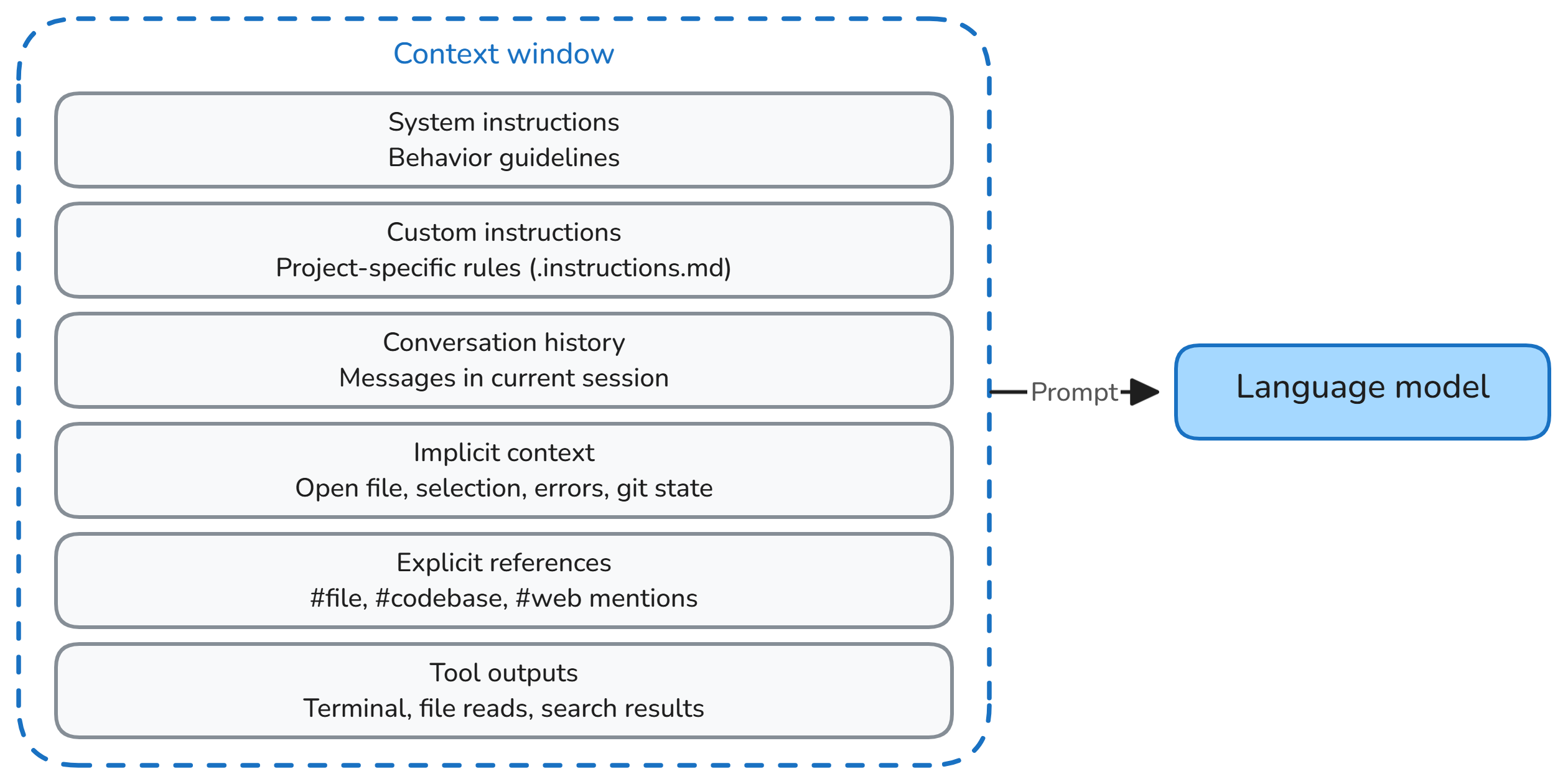
The six layers that make up each prompt
What goes into each request. Diagrams: VS Code docs.

Context rot

Module 2

The measurable drop in quality as input grows, long before the window is full.

  • Lost in the middle. Early instructions in a long session end up in the middle, where models use them least.
  • Distractors. An old stack trace or the previous version of a file actively misleads.
  • Symptoms: forgets a rule it followed an hour ago, reintroduces a fixed bug, rereads files, invents names.
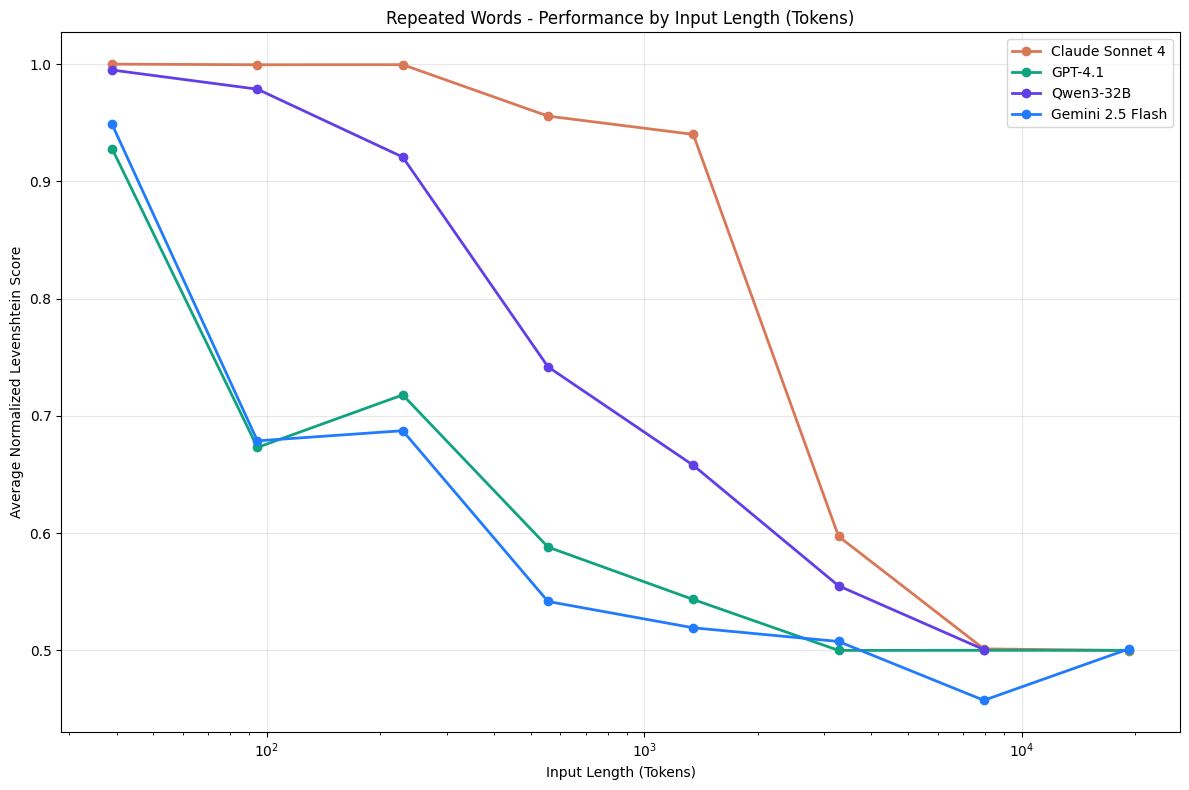
Chroma chart: model scores fall as input length grows
Performance falls with input length on a trivially simple task. Source: Chroma, Context Rot (2025).

The hygiene toolkit

Every lab
MoveWhenHow
Precise contextAlways#file, #selection, #read/problems, MCP resources
CompactFilling up/compact focus on the API decisions
New sessionNew task or rotCarry over a plan file, not the chat
SubagentNoisy researchThe work stays in its window; only the summary returns
Fewer toolsMany MCP serversTurn unused ones off in Configure Tools
Chapter 06 · Part A

Plan, checkpoints, Git

Think before you build, and know exactly which undo button covers what.

The Plan agent

1.94

Researches with read-only tools, asks clarifying questions, and writes a reviewable plan before any code changes.

Run /plan …. In the Local harness the plan lives in session memory (/memories/session/plan.md); then choose Start Implementation or Open in Editor to tweak it first. A plan file is externalized memory: it survives compaction and new sessions.

Cheap trick

Plan with a strong reasoning model, implement with a cheaper one. Set chat.planAgent.defaultModel, or choose Approve Plan Only and switch models.

A quickdraw clipped to a climbing bolt
A quickdraw on a bolt. Photo: Cristian Bortes, Wikimedia Commons, CC BY 2.0.

Checkpoints

Every lab

Snapshots of workspace files and chat at each request. Hover a request → Restore Checkpoint.

Analogy

A climber clips into a bolt every few metres, so a fall only drops them to the last clip. But a clip can't catch a rock already knocked onto someone below. Checkpoints don't undo terminal commands, database writes or MCP tool calls.

ActionCheckpointGit
Files the agent editedRestoresIf committed
Terminal commands, installsNoTracked files only
MCP tool calls (DB writes, API calls)NoNo
Pushed commitsNoRevert, visibly

Nothing in the editor undoes a DELETE on prod.

Chapter 07 · Part B

Where guidance lives

Rules go in instructions. Tasks go in prompt files. Roles go in custom agents. Know-how goes in skills. Must-always-happen goes in hooks.

The customization map

1.91 · 2.01
FileLoaded whenCan the model ignore it?
.github/copilot-instructions.mdEvery chat and agent requestSometimes
.github/instructions/*.instructions.mdWhen a file matches applyTo, or the description matches the taskSometimes
AGENTS.mdEvery agent request; read by Copilot, Codex and othersSometimes
.github/prompts/*.prompt.mdOnly when you run /name—
.github/agents/*.agent.mdWhen selected or delegated toTool limits: no
.github/skills/<name>/SKILL.mdWhen the description matchesSometimes
.github/hooks/*.jsonAt lifecycle eventsNo
.vscode/mcp.jsonTools offered every turn—
The Agent Customizations editor
Chat: Open Customizations shows everything VS Code discovered. Screenshot: VS Code docs.

Instructions are context, not enforcement

1.92

Repo instructions travel with every request: Ask, Plan, Agent, custom agents and subagents. They are not used for inline ghost-text suggestions.

Prove they were used: expand References under an answer, or find the text in the Chat Debug view's system prompt. A harmless "canary" rule (end every response with "📏 repo rules applied") makes it visible.

Trap

applyTo belongs in *.instructions.md. In a prompt file it does nothing. And a copilot-instructions.md in the repo root instead of .github/ is silently ignored.

AGENTS.md: a README for agents

2.06

One short file of project-wide rules that every agent tool reads. Custom agents define roles; AGENTS.md defines shared standards. Nested files per folder are experimental in VS Code (chat.useNestedAgentsMdFiles).

Trap

Everything that applies is combined into one prompt, and a custom agent's own body claims precedence. If the Designer's file says "use inline styles" and AGENTS.md says "no inline styles", don't rely on precedence. Remove the contradiction.

Chapter 08 · Part B

Skills

On-demand know-how, with scripts and resources, that costs almost nothing until it's needed.

An open library card catalog drawer
A card catalog. Photo: Michael Holley, Wikimedia Commons, public domain.

Agent Skills

2.07 – 2.10

A folder with a SKILL.md and optional scripts, templates and references. Only its name and description are in context until a task matches.

Analogy

A library gives you a card per book, not every book on your desk. You fetch the book whose card matches, and only open the appendix if the chapter sends you there. A skill's description is its catalog card.

PROGRESSIVE DISCLOSURE · PAY FOR KNOW-HOW ONLY WHEN YOU USE IT 1 · Name + description every skill, every turn react-widget: "Team standard for telemetry widgets… Use whenever…" 2 · SKILL.md body only when the task matches 3 · scripts/, templates/ only if linked from the body list-scenarios.js, Widget.jsx.md
Forty skills in a repo cost forty one-line cards per request, not forty files.

The rules that bite

2.08 · 2.10
  • The name must match the folder and be lowercase with hyphens. A bad name fails silently; it's the number one "my skill doesn't show up" cause.
  • The description is the trigger. Say what it does and "Use when…", in the words users type.
  • Scripts must print. An agent can only use what a script writes to the terminal.
  • Vite projects are ES modules. A .js script with require() crashes there. Use import, or name it .cjs.
  • disable-model-invocation: true makes a skill run only via /name; user-invocable: false hides it from the menu.
Trap

Community skills run code on your machine. Read the scripts before you add one, exactly as you would a dependency.

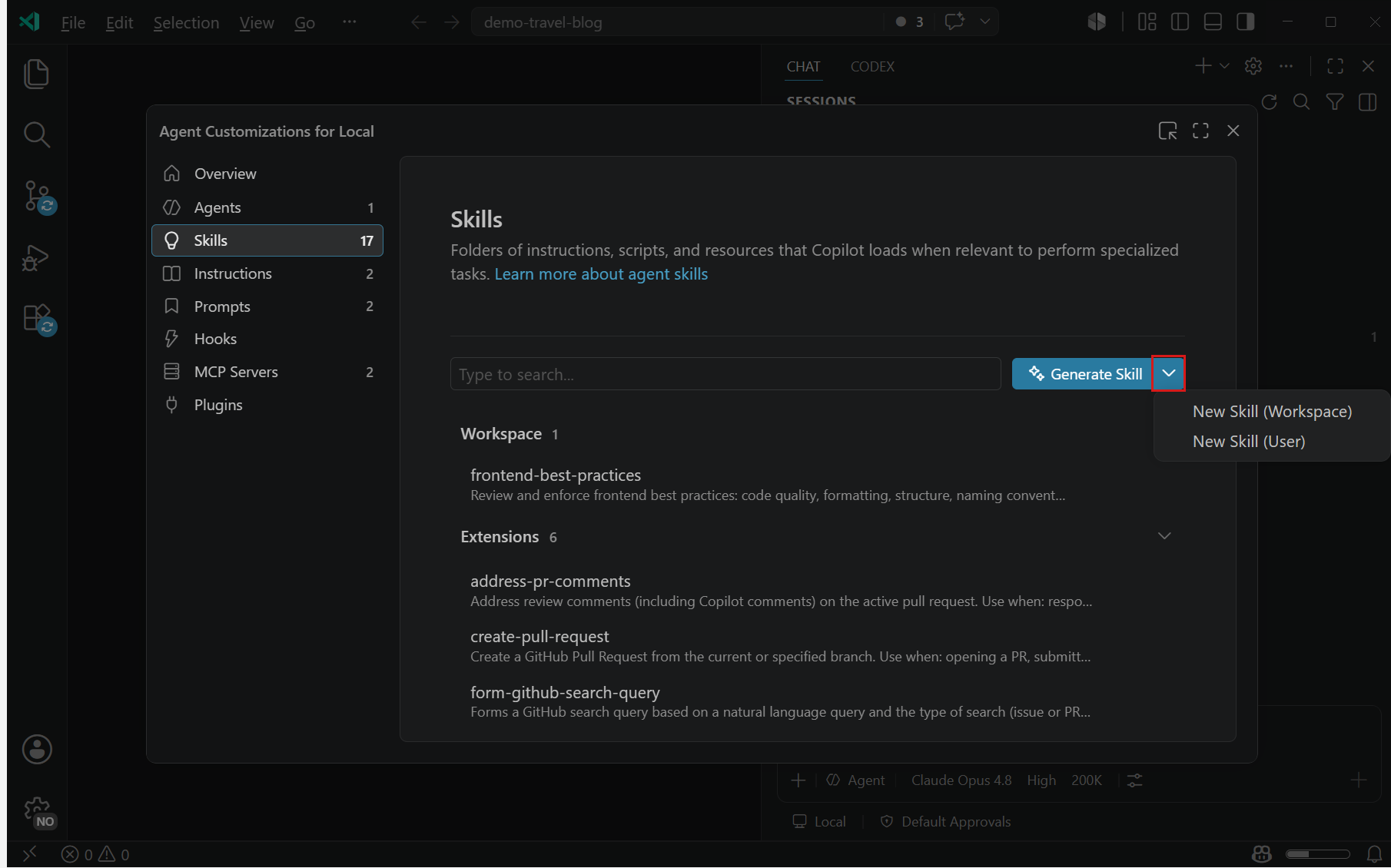
The Skills tab of the Agent Customizations editor with workspace and extension skills
The Skills tab. Screenshot: VS Code docs.
Chapter 09 · Part B

Hooks

Instructions are requests. Hooks are code that runs every time, at fixed points, and can say no.

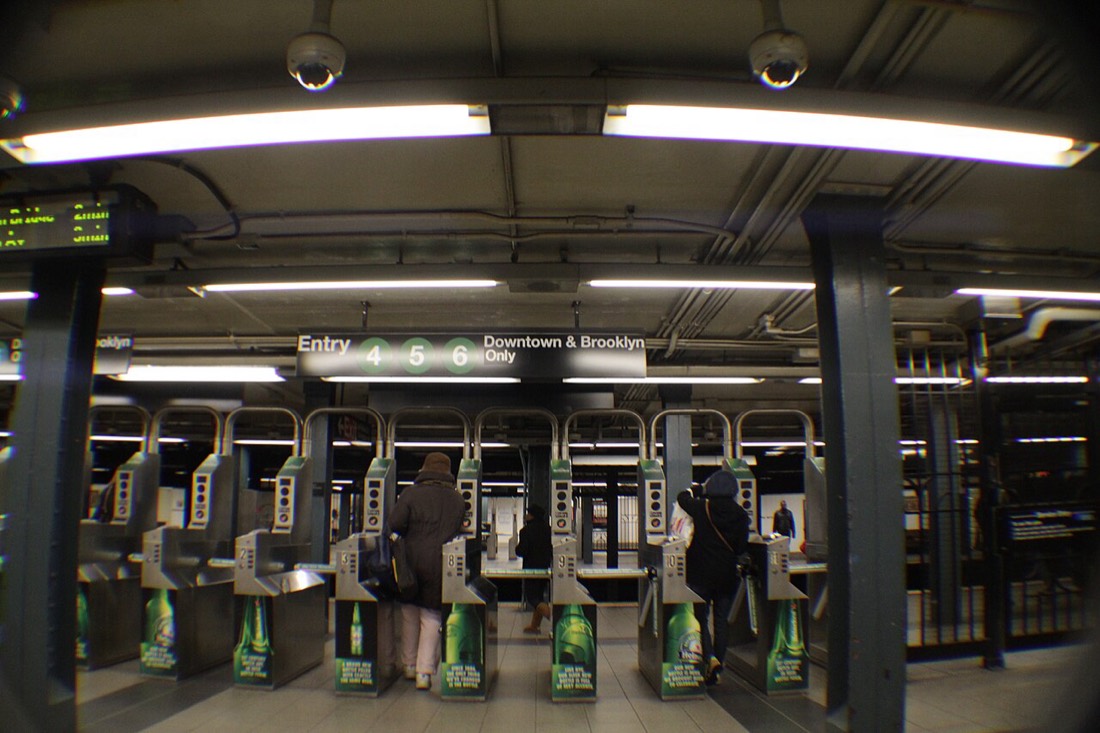
Subway turnstiles
Turnstiles at 86 St, New York. Photo: Fabio Sola Penna, Wikimedia Commons, CC BY 2.0.

Hooks

2.12

Commands the harness runs at lifecycle events. They get the event as JSON on stdin and can log it, add context, or block.

Analogy

"Please pay your fare" is an instruction. A turnstile is a hook. It doesn't care how persuasive you are.

The self-healing build loop

2.12

A PostToolUse hook runs npm run build after every file edit. If it fails, the hook returns a structured block with the compiler output, and the agent fixes its own mistake.

{ "hooks": { "PostToolUse": [
  { "type": "command", "command": "node .github/hooks/scripts/build-validator.cjs", "timeout": 120 }
] } }
// on failure, print and exit 0:
{ "decision": "block",
  "reason": "The project no longer builds. Fix the errors below.",
  "hookSpecificOutput": { "hookEventName": "PostToolUse",
    "additionalContext": "npm run build failed: Could not resolve ./BatteryWidget …" } }
Trap

There's no tool filter in the config: hooks fire for every tool call. Your script checks tool_name itself (replace_string_in_file, create_file, apply_patch…). Test it by piping fake events: echo '{"tool_name":"create_file"}' | node …

Exit codes and events

Local harness
ExitMeaning
0Success. Stdout is parsed as JSON.
2Blocking error. Stderr goes to the model.
otherWarning only; processing continues.

Events: SessionStart · UserPromptSubmit · PreToolUse · PostToolUse · PreCompact · SubagentStart · SubagentStop · Stop. A Stop hook can say "not done yet" (guard it with stop_hook_active, or it loops and bills).

Make guardrails guard themselves

A PreToolUse hook that denies edits to .github/hooks/ means a confused agent can't switch off the hook that's blocking it. That's the difference between a rule and a lock.
Chapter 10 · Part C

Agents, subagents, handoffs

A custom agent is a definition. A subagent is an execution. A handoff is a button.

Side by side

2.02 · 2.03
Custom agentSubagentHandoff
WhatA role: persona, tools, model, hooksA temporary worker another agent launchesA button to the next agent with a pre-filled prompt
Started byYouThe model, via agent toolYou, with a click
SeesThe conversationOnly its task. Returns a summary.The conversation
In the courseOrchestratorPlanner, Designer, CoderPlanner → "Build it"
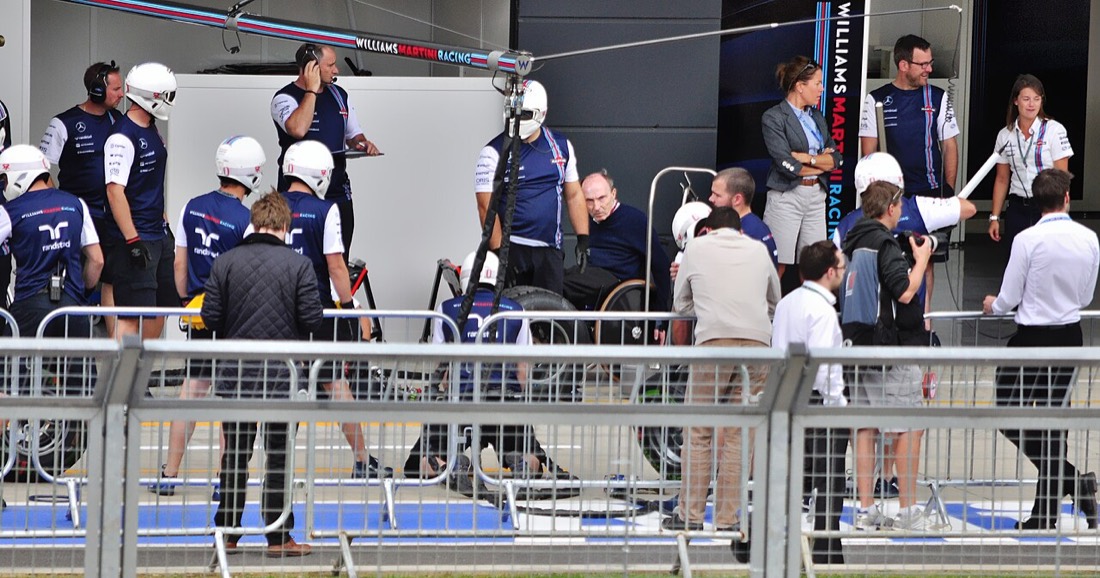
A Formula 1 pit crew practising a pit stop
About 20 people, one job each, under three seconds. The race engineer gets a radio message: "done". That's a coordinator with subagents. Photo: pedrik, Wikimedia Commons, CC BY 2.0.

The frontmatter that matters

2.02
---
name: Orchestrator
description: Breaks work into phases and delegates. Never writes code.
model: ['Claude Sonnet 5.5 (copilot)', 'GPT-5.6 Terra (copilot)']  # list = fallbacks
tools: ['read/readFile', 'agent', 'vscode/memory']                 # no edit!
agents: ['Planner', 'Designer', 'Coder']                           # who it may call
---
  • user-invocable: false hides a specialist from the picker; it's subagent-only.
  • disable-model-invocation: true is the reverse: humans can pick it, agents can't call it. Good for an independent reviewer.
  • Nesting is off by default (chat.subagents.allowInvocationsFromSubagents, max depth 5).
  • No setting is needed any more to use custom agents as subagents.
Trap

A subagent doesn't inherit your conversation. Write its task like a ticket: goal, what it may touch, what to return. The requirement you typed three messages ago isn't there unless the coordinator passes it on.

Least privilege

A hotel key card opens your room, not every room. A Planner without edit can't edit, however confused it gets. Saltzer and Schroeder wrote the principle down in 1975; it fits agents perfectly.

Chapter 11 · Part C

Prove what happened

"It worked" is a claim. Logs are the evidence.

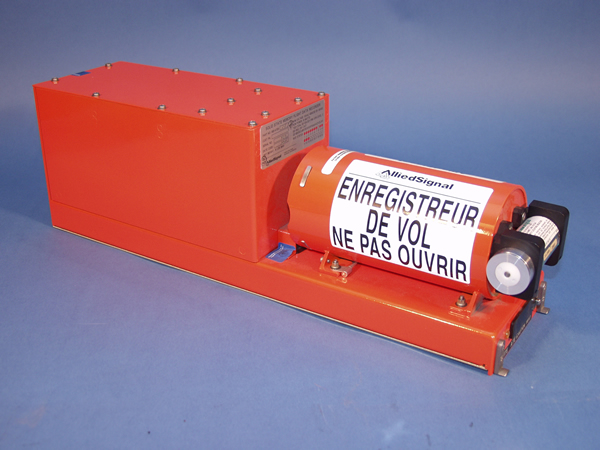
An orange flight data recorder
A flight data recorder. Photo: NTSB, Wikimedia Commons, public domain.

Two X-rays

2.04
  • Chat Debug view (/debug): the exact system prompt, context, tools and response for each request. Is my instruction there? What did the model see about my MCP tool?
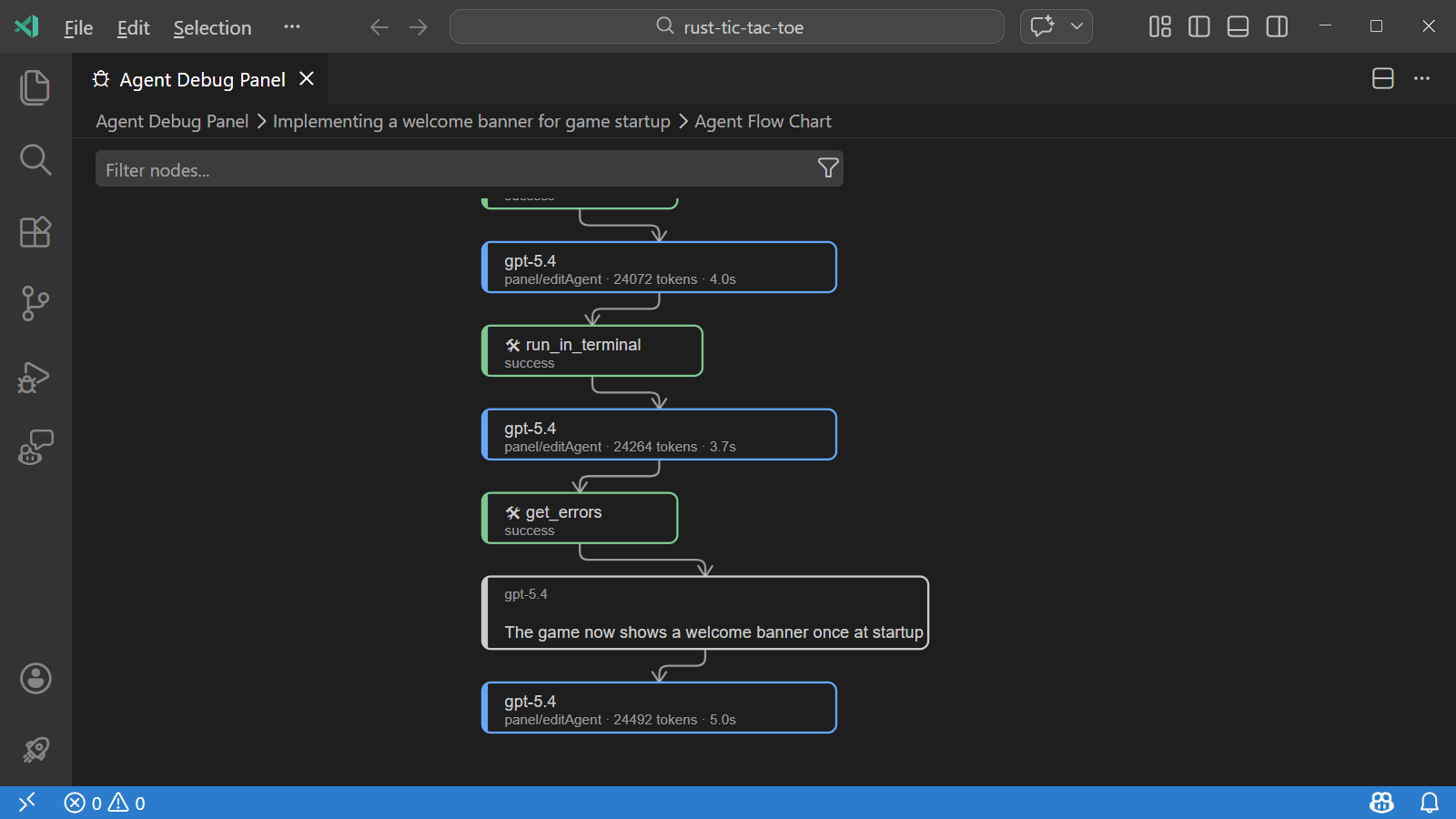
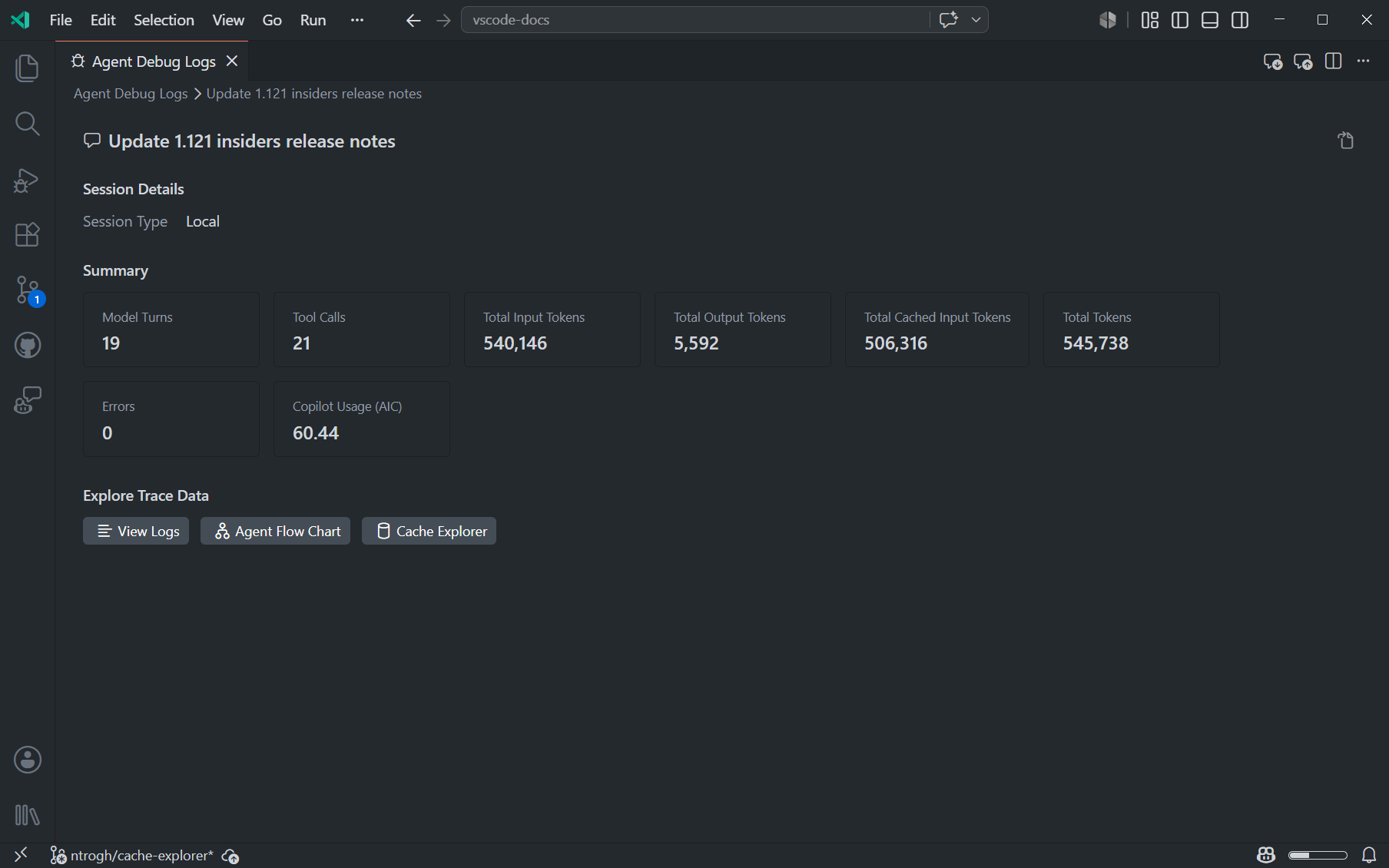
  • Agent Debug Logs: a timeline of model calls, tool calls, subagents and discovery events, plus a flow chart and a token Summary.
Empty panel?

Logs aren't retroactive. Turn on github.copilot.chat.agentDebugLog.fileLogging.enabled and reload before the run.

The Agent Flow Chart
Agent Flow Chart.
The Summary view
Summary. Screenshots: VS Code docs.
/troubleshoot Which subagents ran, which model did each use, and which one used the most tokens?
Chapter 12 · Part C

Local vs cloud agents

The same .agent.md files can drive an agent on your laptop or in GitHub's cloud. Same format, very different execution.

Side by side

2.13
Local agentCopilot cloud agent
Runs onYour machine or a Dev ContainerAn ephemeral GitHub Actions sandbox
Started fromChat, Agents windowAssign to Copilot on an issue, the agents tab, VS Code, CLI, Slack, automations…
You steerLive, in chatAsynchronously, with @copilot PR comments
ProducesEdits in your working treeA branch and a pull request
SetupAlready your dev boxcopilot-setup-steps.yml
BillingAI creditsAI credits + Actions minutes

"Copilot coding agent" is now called Copilot cloud agent in GitHub's docs.

What makes a good cloud task

2.14

Bounded, testable, PR-shaped, reviewable.

The incident lab delegates a retry bug: the service hammers a rate-limited provider, ignoring Retry-After. The issue states symptoms, suspected cause, acceptance criteria and how to validate (npm test). Issue quality decides PR quality.

Review like a lead engineer

Check the diff is focused, tests would fail on the old code, nothing unrelated changed, and timing tests aren't flaky. Retry-After as an HTTP-date has one-second precision, so a 1.5-second threshold fails at random.

Delegate a bounded task, then review the PR like it's yours.

Chapter 13 · Part D · MCP

What MCP is

The Model Context Protocol is an open standard for connecting AI applications to tools and data. One plug shape, many devices.

A USB-C cable plug next to a USB-C port on the edge of a laptop
A USB-C plug and port. Photo: Wikideas1, Wikimedia Commons, CC0.

USB-C for AI

3.01 · 3.02

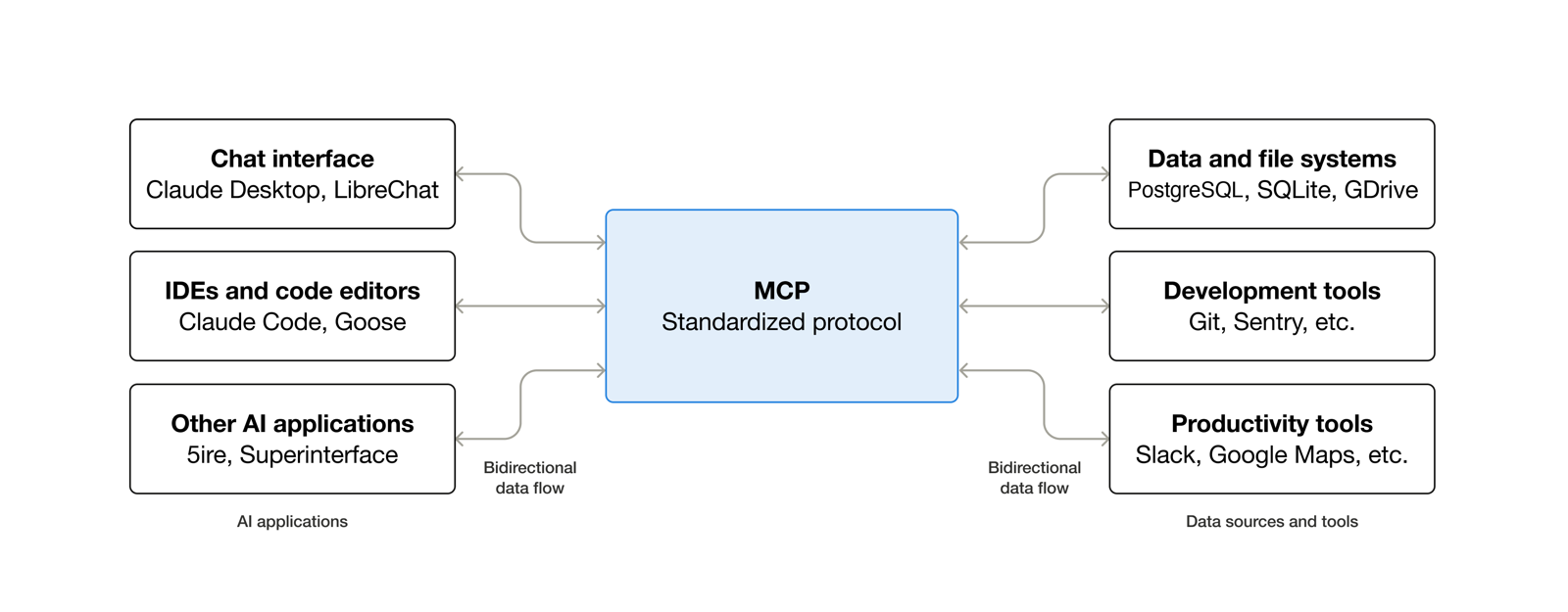
Before MCP, every AI app needed a custom integration for every tool. With MCP, each side implements the protocol once.

Analogy

Before USB, every printer, mouse and camera had its own connector and driver. USB-C means one port takes them all. Three AI apps and ten tools used to be 30 integrations; with MCP it's 13 implementations.

Tidbit

Anthropic introduced MCP in November 2024 and donated it to the Linux Foundation's Agentic AI Foundation in December 2025, so no single vendor controls it.

AI applications on the left connect through MCP to data sources and tools on the right
MCP between AI applications and the systems they need. Diagram: modelcontextprotocol.io.

Host, client, server

3.02
RoleWhoDoes
HostVS Code + CopilotRuns the model, manages connections, shows approvals
ClientOne per server, inside the hostSpeaks MCP to exactly one server
ServerYour code or someone else'sExposes capabilities and does the real work

Copilot thinks. Servers act. Servers enforce.

Three primitives, three controllers

3.02 · 4.01
PrimitiveControlled byExample
ToolsThe model decides to call themrun_sql_query, create_issue
ResourcesThe app or user attaches themcatalog://schema
PromptsThe user runs them/service-catalog.incident-brief

A server can also ask the user a question mid-call (elicitation, Chapter 19).

MCP is not RAG

3.02

RAG retrieves documents into the prompt. MCP calls live systems and returns structured results, and can take actions. They combine: a docs server like Context7 is retrieval exposed over MCP, which is why the course's Coder agent checks it before writing code.

Chapter 14 · Part D · MCP

One protocol, many transports

JSON-RPC is the language. The transport is the delivery truck. Change the truck and the conversation stays the same.

The Rosetta Stone in its glass case at the British Museum
The Rosetta Stone, British Museum. Photo: APK, Wikimedia Commons, CC BY 4.0.

Protocol vs transport

3.03 · 3.08

MCP messages are always JSON-RPC 2.0. They travel over stdio (a local process) or Streamable HTTP (a web endpoint).

Analogy

The Rosetta Stone carries one decree in three scripts. The meaning didn't change with the script, which is exactly why it could be decoded. In Lab 3.08 you swap HTTP for stdio and the same tools behave identically.

The four message shapes

3.03
request       {"jsonrpc":"2.0","id":3,"method":"tools/call","params":{"name":"run_sql_query","arguments":{…}}}
result        {"jsonrpc":"2.0","id":3,"result":{"content":[{"type":"text","text":"[…]"}]}}
error         {"jsonrpc":"2.0","id":3,"error":{"code":-32602,"message":"Unknown tool"}}
notification  {"jsonrpc":"2.0","method":"notifications/initialized"}      ← no id, no reply (HTTP 202)
Why REST isn't MCP

Lab 3.05's first server has GET /mcp and POST /mcp/call. It looks reasonable, but Copilot sends JSON-RPC to POST /mcp starting with initialize, and gets a 404 page back. "Waiting for server to respond to initialize" in the Output log is the clue.

stdio vs Streamable HTTP

3.03
stdioStreamable HTTP
Who runs itVS Code spawns the processYou start it; VS Code connects
NetworkNoneOne endpoint, e.g. POST /mcp
AuthRuns as youTokens, OAuth
Best forLocal dev toolsShared team services
Logs go tostderr only (stdout is the protocol)Anywhere
Tidbit

The original 2024 "HTTP+SSE" transport is deprecated. In mcp.json, "type": "http" means Streamable HTTP.

Chapter 15 · Part D · MCP

Wiring servers into VS Code

Copilot doesn't scan anything. VS Code reads config, checks trust, starts or connects, lists tools, and hands them to the model.

The config file

3.00 · 3.04
// .vscode/mcp.json
{
  "inputs": [{ "type": "promptString", "id": "catalog-key", "description": "API key", "password": true }],
  "servers": {
    "service-db": { "type": "stdio", "command": "node",
                    "args": ["${workspaceFolder}/mcp-server/stdio-server.js"] },
    "catalog":    { "type": "http", "url": "http://localhost:4000/mcp",
                    "headers": { "Authorization": "Bearer ${input:catalog-key}" } }
  }
}
servers vs mcpServers

VS Code's own .vscode/mcp.json uses servers. The portable root .mcp.json, the Inspector, Claude and Copilot CLI use mcpServers. Mixing them up is the top "my server doesn't appear" bug.

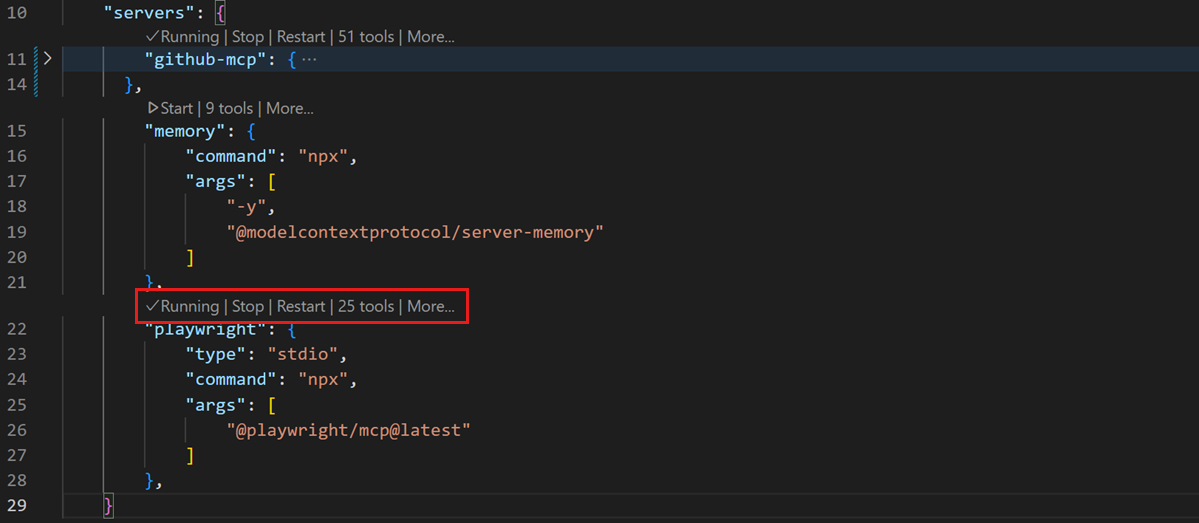
mcp.json with Running, Stop, Restart and tool count lenses above each server
Lenses above each server: Start, Running, Restart, N tools. No VS Code restart needed. Screenshot: VS Code docs.

Trust, startup, caching

3.04
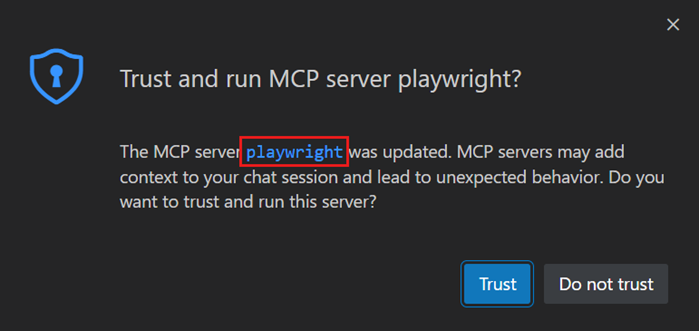
  • Trust: workspace servers inherit Workspace Trust. Others show a trust dialog the first time.
  • HTTP servers: the Restart lens only reconnects. It doesn't run node for you.
  • Stale tools: VS Code caches tools/list. After changing tools, restart the server or run MCP: Reset Cached Tools.
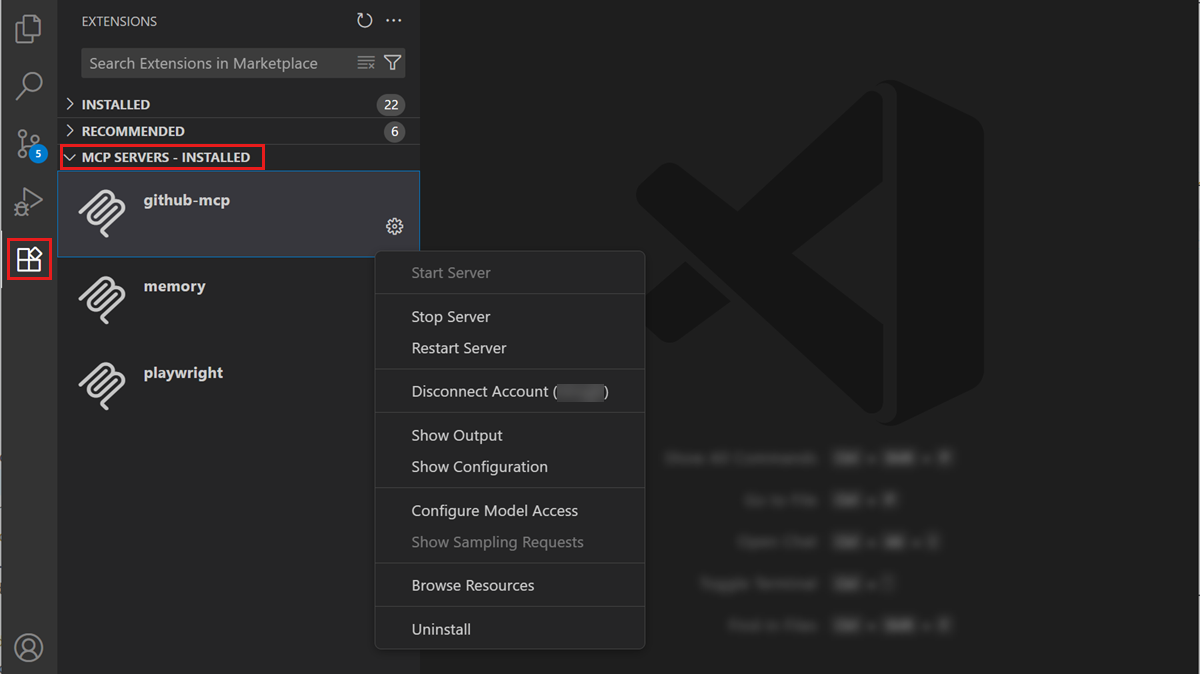
  • Install from the gallery: search @mcp in the Extensions view.
  • Debug: MCP: List Servers → Show Output shows the handshake and errors.
The MCP server trust dialog
The trust dialog.
Installed MCP servers in the Extensions view with a context menu
Installed servers in the Extensions view. Screenshots: VS Code docs.
Chapter 16 · Part D · MCP

How the model picks a tool

The model never makes a network call. It reads tool descriptions, asks for a call, and the host places it.

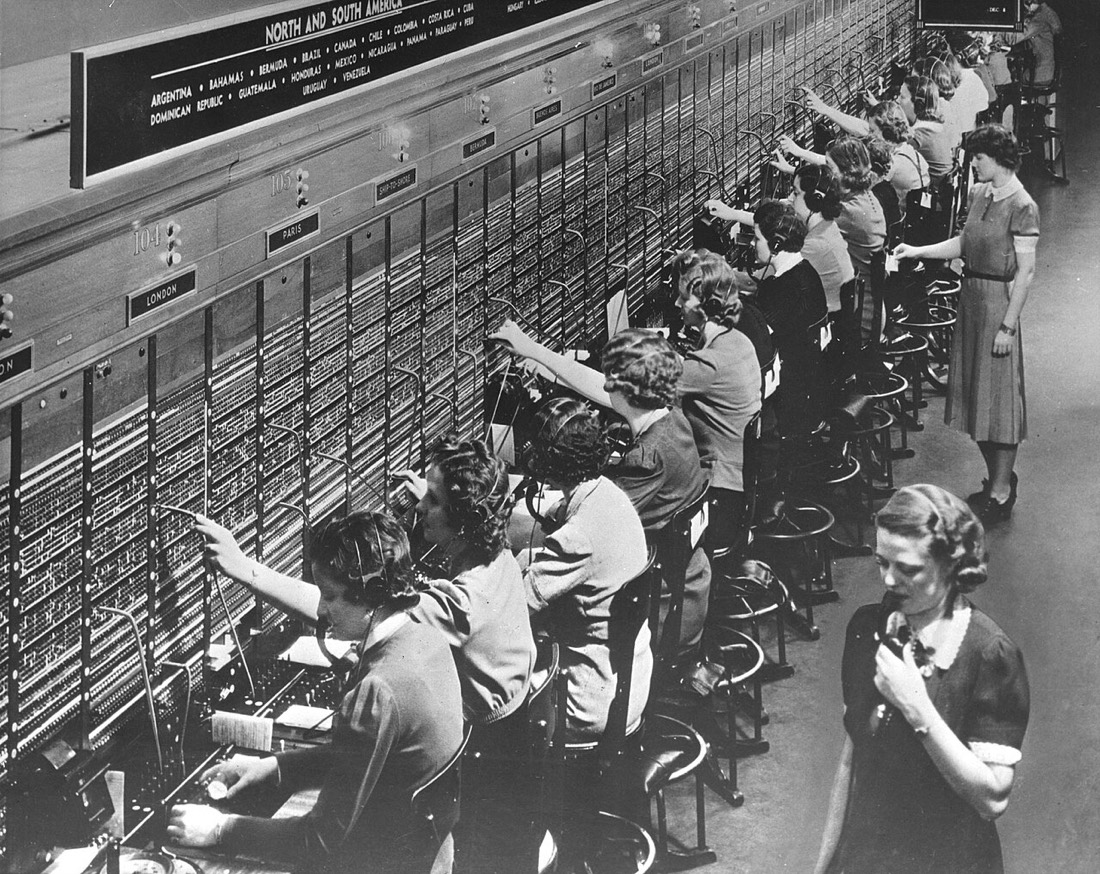
Rows of women working at a Bell System telephone switchboard
Bell System switchboard operators. Photo: U.S. National Archives, Wikimedia Commons, no known restrictions.

Model chooses, host connects

3.06

The model emits "call run_sql_query with this SQL". VS Code asks your permission, sends tools/call, and returns the result.

Analogy

A caller tells the operator who they want. The operator decides whether to connect, plugs the cord into the right jack and stays on the line. The caller never touches the wiring. The model is the caller; VS Code is the operator.

Descriptions are prompts

3.06

Change a tool's description to "Utility function" and Copilot stops calling it. Write "Query the service inventory (table services: name, owner, environment, criticality). Use for questions about which services exist…" and it calls it immediately, with better SQL.

  • The model chooses individual tools, not servers. A server is a toolbox.
  • Parameter descriptions matter too: valid values in the description mean fewer probing queries.
  • The Chat Debug view shows exactly what the model saw about your tool.

Your tool description is prompt engineering.

How it discovers a schema

3.07

Nobody told Copilot the table names. Because the tool accepts raw SQL, it probes: SELECT name FROM sqlite_master, then PRAGMA table_info(services). That's clever, and it's also exactly why raw SQL is dangerous: the same freedom that discovers can also DROP TABLE.

Chapter 17 · Part D · MCP

The security boundary

MCP lets a client call tools. It does not make those tools safe. Your server is the gate.

A raised iron portcullis in a stone castle gateway
The portcullis gate at Raby Castle. Photo: Ian Greig, Wikimedia Commons, CC BY-SA 2.0.

Tool calls are untrusted input

3.11

Treat every tools/call like a form post from the internet. A misunderstanding, a careless prompt or injected text all arrive as perfectly valid JSON.

Analogy

The castle doesn't rely on visitors promising to behave. The gate decides who and what gets through, whatever the visitor says. In Lab 3.11, "Delete all prod services" deletes prod until the server's gate closes.

THE SERVER DECIDES · NOT THE MODEL Copilot untrusted requester Server boundary validate · restrict dry-run · confirm · log SQLite isError: "Blocked… use the safe tool" tools/call allowed blocked the model reads the reason and pivots
Return policy blocks as a tool result with isError: true, not a protocol error. The model can read it and switch to the validated tool.

The defensive patterns

3.11 · 3.12
PatternIn the course
Capability checks over string checksstmt.reader asks SQLite whether a statement only reads. startsWith("SELECT") wrongly blocks WITH … SELECT and is easy to fool.
Defense in depthAlso open the database { readonly: true }, so a bug in your check can't hurt you.
Remove the capabilityReplace run_sql_query(query) with three narrow tools that take enums and run fixed, parameterized queries.
Dry-run by defaultdelete_services_by_environment previews unless told otherwise.
Re-validateA schema enum guides well-behaved clients; the server still checks.
AuditLog every call with its outcome.
The confirm-token trap

Lab 3.11's prod delete needs confirmToken: "DELETE_PROD", but the token is written in the tool's description, so the model can supply it itself. That's a speed bump against accidents, not human confirmation. Real confirmation asks the human: elicitation, Chapter 19.

Chapter 18 · Part D · MCP

Designing great tools

A tool definition is an API contract and a prompt. Models read every word; programs rely on every field.

Anatomy of a tool (SDK v2)

4.02
server.registerTool("get_service_health", {
  title: "Get service health",                                   // what humans see
  description: "Current health snapshot for one service: status, " +
               "error rate and p95 latency.",                    // what + when
  inputSchema: z.object({ service: z.string().regex(/^[a-z0-9-]+$/) }),
  outputSchema: Health,                                          // typed results
  annotations: { readOnlyHint: true, idempotentHint: true },     // behavior hints
}, async ({ service }) => {
  const snapshot = await lookup(service);
  return { content: [{ type: "text", text: JSON.stringify(snapshot) }],
           structuredContent: snapshot };                        // both!
});
  • One job per tool, named verb_noun.
  • Tight inputs: enums, ranges, patterns. Invalid input never reaches your handler.
  • Output schema: the SDK refuses to send results that break your own contract ("Output validation error").
  • Annotations (readOnlyHint, destructiveHint…) are hints for UX and approvals. Clients mustn't trust them from unknown servers.
  • Bound your output: a 100,000-line log eats context and credits. Cap it and say so in the description.

Two kinds of errors

4.02
KindExampleHowWho reads it
Tool execution errorBad business input, policy block, failed APIisError: true result (or throw)The model, which can self-correct
Protocol errorUnknown tool, malformed requestJSON-RPC errorThe client
Trap

A thrown error's message goes straight to the model, and into transcripts and logs. A raw database error can leak SQL, paths or hostnames. Catch it, sanitize it, return something helpful.

Chapter 19 · Part D · MCP

Resources, prompts, elicitation

Tools aren't the only primitive. Give users context they can attach, templates they can run, and a way for your server to ask them a question.

Resources and prompts

4.01
  • Resources: catalog://schema or a template like catalog://services/{name}. In VS Code, Add Context → MCP Resources. The answer uses the record without a tool call.
  • Prompts: /service-catalog.incident-brief asks for service and symptom, then sends a ready-made task. Arguments can autocomplete (completable()).
  • Server instructions: one paragraph added to the system prompt of every client. "Prefer list_services over raw SQL. Never guess owners."

Elicitation: the server asks the human

4.03

Mid-call, the server asks the user a structured question (a small form), and continues with the answer.

decommission_service asks "Decommission analytics-worker (dev, low criticality, owned by Data Team)?" with a confirm box and a reason. Decline, and nothing is deleted.

ONE CONFIRMATION · TWO ERAS Legacy (VS Code today) 1 · client → tools/call 2 · server → elicitation/create call waits on the open connection 3 · user answers in a form 4 · server finishes the call ctx.mcpReq.elicitInput(…) Modern (2026-07-28) 1 · client → tools/call 2 · server → result "input_required" 3 · client asks the user 4 · client retries with inputResponses 5 · server completes return inputRequired(…)
The course's helper detects the era (ctx.mcpReq.envelope only exists on modern requests) and handles both.
The bug we hit building the lab

In the modern branch, if the server only checks "do I have an accepted answer?", a decline looks the same as "haven't asked yet", so it asks again forever (the client gives up after 10 rounds). Check whether any answer arrived first.

Two different gates

VS Code's tool approval asks "may the agent call this tool?". Elicitation asks "do you, the human, confirm this specific action, and why?". The second comes from the server, so a client's auto-approve setting can't skip it. And never ask for secrets in a form: use URL-mode elicitation or proper auth.

Chapter 20 · Part D · MCP

Remote servers & sandboxing

Once a server listens on a port, it's a web service. Once it runs locally, it runs as you.

A remote server, minimum viable safety

4.04
const app = createMcpExpressApp({ host: "127.0.0.1" });   // Host-header allow-list on
app.all("/mcp", requireApiKey,                            // bearer token, constant-time compare
  (req, res) => mcp(req, res, req.body));                 // createMcpHandler: stateless, both eras
app.listen(4000, "127.0.0.1");                            // loopback only
  • DNS rebinding: a malicious web page makes your browser call 127.0.0.1 under its own hostname. Checking Host and Origin stops it (wrong Host → 403, even with the token).
  • Secrets: ${input:catalog-key} with "password": true keeps the key out of the repo.
  • Next step: OAuth 2.1 so the server knows who, not just "someone with the key".

Sandboxing local servers

4.04 · macOS/Linux
"sandbox": {
  "filesystem": { "allowWrite": ["${workspaceFolder}/data"], "denyRead": ["~/.ssh", "~/.aws"] },
  "network":    { "allowedDomains": ["registry.npmjs.org"] }
},
"servers": { "service-catalog": { "type": "stdio", "command": "node",
  "args": ["${workspaceFolder}/mcp-server/catalog-server.js"], "sandboxEnabled": true } }

Tool calls to sandboxed servers are auto-approved, because the sandbox is the safety net. Admins can require it.

Analogy

A sandboxed server is a contractor working in one room with the other doors locked. They can do the job; they can't wander into the study.

Chapter 21 · Part D · MCP

Inspector & testing

"It worked when I tried it in chat" isn't a test. Drive your server directly, without a model.

MCP Inspector

3.09 · 3.10

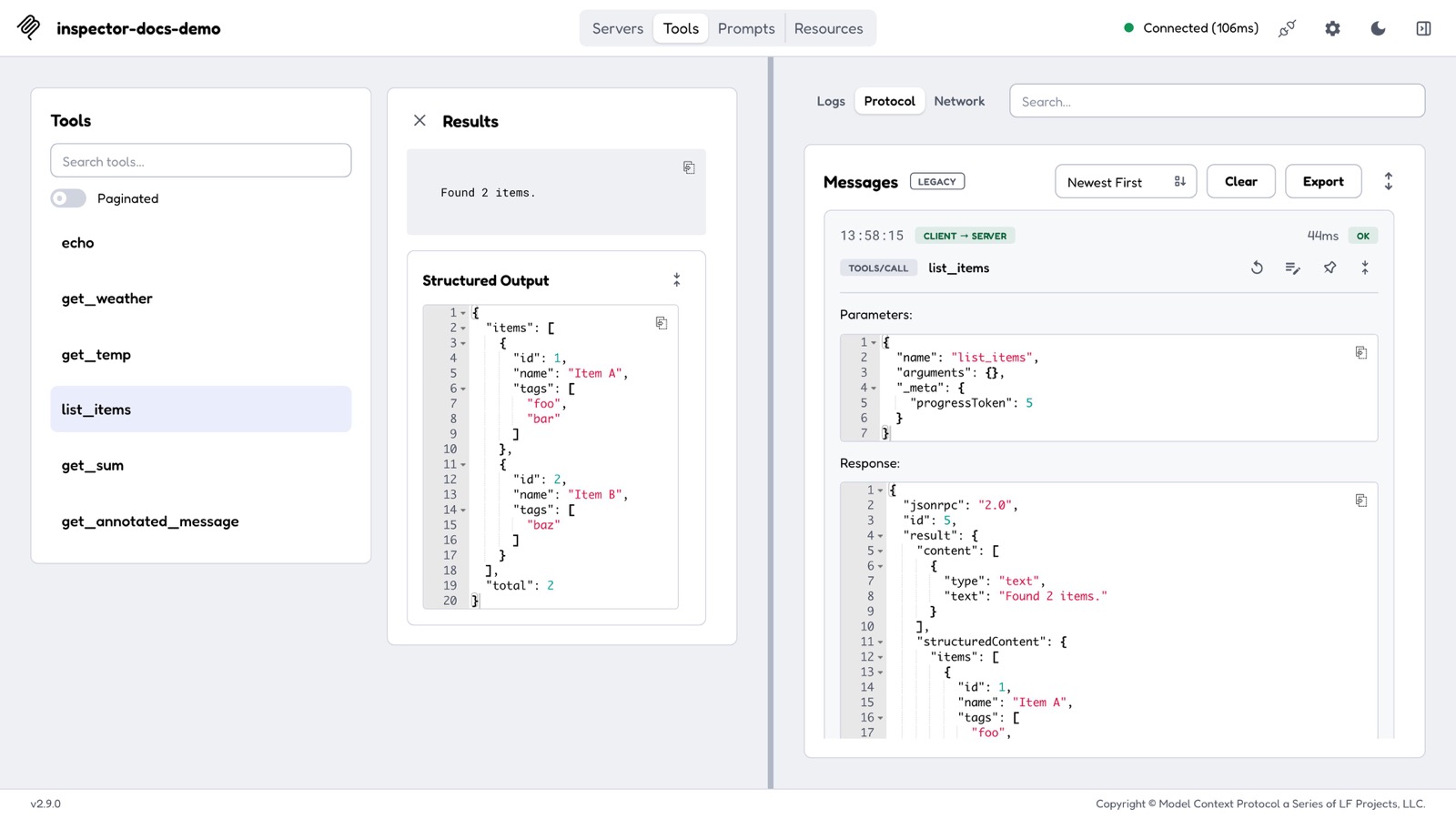
The official debugging client: a web UI, a CLI and a TUI in one package. It shows the handshake, tool schemas, raw requests and responses, HTTP status codes and stderr.

npx @modelcontextprotocol/inspector                        # web UI (opens a URL with a session token)
npx @modelcontextprotocol/inspector --cli node server.js --method tools/list
npx @modelcontextprotocol/inspector --cli http://localhost:3333/mcp --transport http \
    --protocol-era legacy --method tools/call --tool-name run_sql_query --tool-arg "query=SELECT 1"

Needs Node 22.19+. If Copilot is the black box, the Inspector is the glass box.

MCP Inspector web client after a tool call, with the Protocol monitor pinned on the right
The Inspector with the Protocol monitor pinned. Screenshot: modelcontextprotocol.io.

The mystery server

3.10

Lab 3.10 hides three protocol bugs in one server. Each shows a different symptom:

SymptomCause
A declared tool vanishesIts inputSchema lacks "type": "object"; clients drop invalid tools
A call "succeeds" with nothing in it{ text } instead of { content: [{ type: "text", text }] }
A call hangs for a minuteA hard-coded response id; the client can't match it to its request
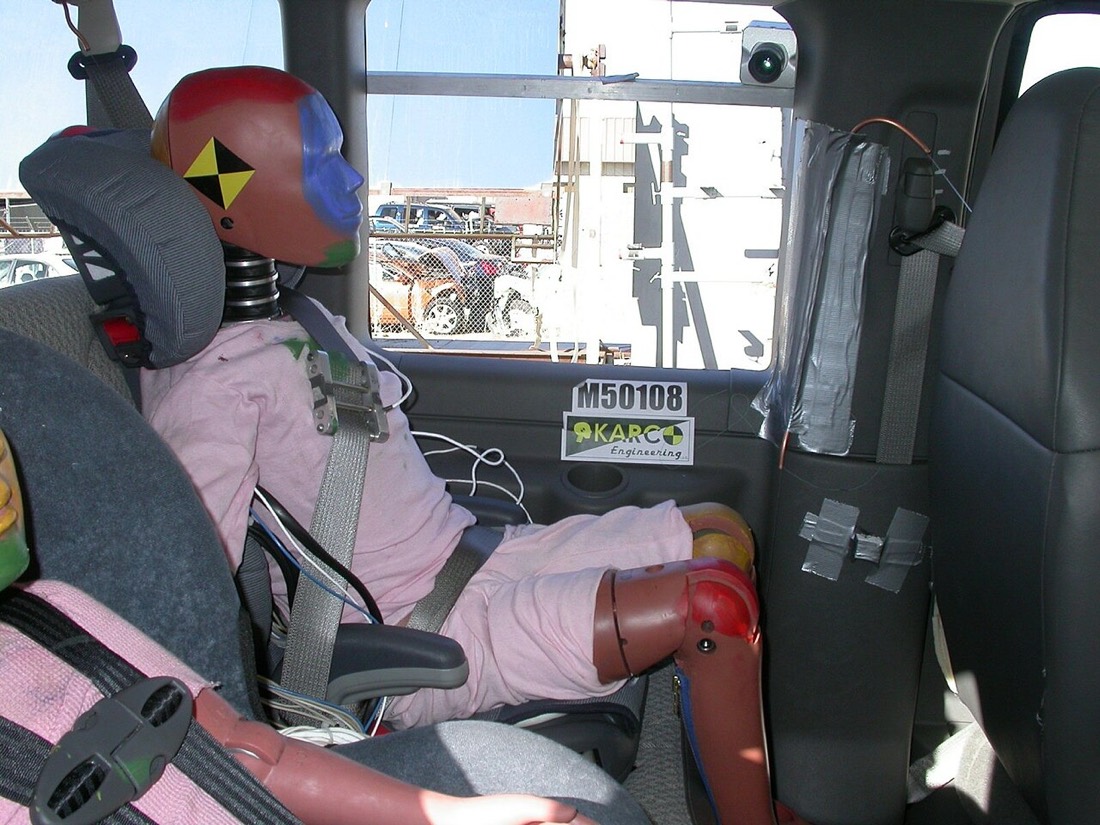
A crash test dummy seated in the back seat of a test vehicle
A crash test dummy before a test. Photo: Karco Engineering for NHTSA, Wikimedia Commons, public domain.

Three layers of confidence

4.05
  • Unit tests with node:test and the SDK's client: list tools, call them, read resources, assert.
  • Contract gate: inspector --cli … --method tools/list --strict exits 6 on non-portable schemas (a z.tuple does it).
  • Era check: run with --protocol-era legacy and modern.
Analogy

Carmakers don't find out about crashes from customers. They crash cars on purpose, with dummies full of sensors. Your test suite is the dummy.

Chapter 22 · Part D · MCP

MCP in 2026

The July 2026 spec made MCP stateless. Here's what changed, and what it means for servers you write today.

Then vs now

4.00
Legacy (≤ 2025-11-25)Modern (2026-07-28)
Openinginitialize → initializedNone; optional server/discover
VersionNegotiated onceOn every request (_meta + header)
SessionsMcp-Session-IdNone; state lives in explicit handles
Asking the userServer-initiated requestinput_required result + retry (MRTR)
Optional featuresIn coreExtensions: Apps, Tasks, …
DeprecatedSampling, roots, logging, HTTP+SSE (working for at least 12 more months)
Where VS Code is

We checked VS Code 1.140: its built-in MCP client still opens with initialize (2025-11-25). So servers must speak the legacy era to work in VS Code today, ideally dual-era so modern clients work too.

SDK v2 entry points

4.00
CodeEras served
server.connect(new StdioServerTransport())Legacy only (fine for VS Code)
serveStdio(() => buildServer())Both, over stdio
createMcpHandler(() => buildServer())Both, over HTTP, stateless

Packages moved from @modelcontextprotocol/sdk (v1) to @modelcontextprotocol/server and /client (v2), with z.object(…) schemas from zod/v4. A model trained before mid-2026 will happily write v1 code, which is exactly the case for a docs MCP server.

Watch it happen

Point the Inspector at Lab 3.05's hand-written server in auto mode. Your terminal shows server/discover → 404 → initialize: a modern client politely falling back to an older server.

Chapter 23 · Reference

Crib sheet

Commands, file shapes and fixes you'll reach for, in one place.

In chat

/planResearch and plan first/compact <focus>Summarize history
/initDraft repo instructions/agents /skills /hooksOpen customizations
/create-skillGenerate a skill/troubleshootAsk the debug logs
/debugChat Debug view/<server>.<prompt>Run an MCP prompt

MCP commands

MCP: List ServersStart, stop, restart, Show Output
MCP: Reset Cached ToolsAfter changing a server's tools
MCP: Browse ResourcesExplore a server's resources
MCP: Reset TrustForget trust decisions
@mcp in ExtensionsThe MCP server gallery

Minimal MCP server (stdio, SDK v2)

import { McpServer } from "@modelcontextprotocol/server";
import { StdioServerTransport } from "@modelcontextprotocol/server/stdio";
import * as z from "zod/v4";

const server = new McpServer({ name: "hello-mcp", version: "1.0.0" });
server.registerTool("ping",
  { description: "Connectivity check. Use when asked to test the MCP connection.",
    inputSchema: z.object({}) },
  async () => ({ content: [{ type: "text", text: "pong" }] }));

console.error("started");          // stderr only — stdout is the protocol
await server.connect(new StdioServerTransport());

When something's wrong

SymptomFix
"Waiting for server to respond to initialize"Server isn't speaking JSON-RPC on POST /mcp, or isn't running
ERR_DLOPEN_FAILEDNode version mismatch with native modules
Server missing from the listservers vs mcpServers; untrusted workspace
Copilot sees old toolsRestart server or Reset Cached Tools
Skill doesn't show upName must match folder, lowercase-hyphens
Hook never runsTrusted workspace? Local harness? Valid JSON on stdout?
require is not definedES module project: use import or .cjs
Chapter 24 · Reference

Glossary A–Z

Every term in one list, each linked to the chapter that explains it.

AGENTS.md
A cross-tool README for AI agents: short, project-wide rules. Ch 07
Agent Debug Logs
Timeline of model calls, tool calls, subagents and discovery, with a flow chart and token summary. Ch 11
AI Credits
Usage-based billing since June 1, 2026: 1 credit = $0.01, metered by tokens. Ch 03
Annotations
Tool hints like readOnlyHint and destructiveHint. Untrusted from unknown servers. Ch 18
applyTo
Glob in *.instructions.md that auto-attaches it to matching files. Does nothing in prompt files. Ch 07
Checkpoint
Snapshot of files and chat per request. Doesn't undo terminal commands or MCP calls. Ch 06
Cloud agent
Copilot running in a GitHub Actions sandbox, returning a PR. Formerly "coding agent". Ch 12
Context rot
Quality drop as the context grows. Ch 05
Custom agent
An .agent.md role: persona, tools, model, allowed subagents, handoffs. Ch 10
DNS rebinding
A web page reaching your localhost server under its own hostname. Stopped by Host/Origin checks. Ch 20
Dual-era
A client or server that speaks both the legacy handshake and the 2026 stateless protocol. Ch 22
Elicitation
A server asking the user a structured question mid-call. Ch 19
Handoff
A button to the next agent with a pre-filled prompt. Ch 10
Harness
The engine that runs the agent loop: Local, Copilot, Claude, Codex, Cloud. Ch 02
Hook
A command the harness runs at a lifecycle event; can block. Ch 09
Host, client, server
The three MCP roles: VS Code hosts, one client per server, servers expose capabilities. Ch 13
initialize
The legacy MCP handshake request. VS Code still sends it. Ch 14
Inspector
The official MCP debugging client: web, CLI and TUI. Ch 21
isError
A tool result flagging an execution error the model can read and recover from. Ch 18
JSON-RPC 2.0
The message format of every MCP message: request, result, error, notification. Ch 14
Least privilege
Give each agent or tool only what its job needs. Ch 10
MCP
Model Context Protocol: the open standard connecting AI apps to tools and data. Ch 13
mcp.json
.vscode/mcp.json: VS Code's server config, top-level servers. Ch 15
MRTR
Multi Round-Trip Requests: return input_required, the client retries with answers. Ch 22
outputSchema
A tool's declared result shape; the SDK validates structuredContent against it. Ch 18
Plan agent
Built-in agent that researches and plans before code. Ch 06
Progressive disclosure
Skills load description → body → resources only as needed. Ch 08
Prompt (MCP)
A user-run template a server exposes, e.g. /server.prompt. Ch 19
Prompt file
*.prompt.md: a saved task you run with /name. Ch 07
Resource
Context a server exposes by URI for the user or app to attach. Ch 19
Sandbox
VS Code restricting a local MCP server's file and network access. Ch 20
server/discover
The optional 2026 call for a server's versions and capabilities; legacy servers answer 404. Ch 22
Session Target
The picker that chooses the harness. Ch 02
Skill
A folder with SKILL.md, loaded when its description matches. Ch 08
stdio
MCP over a local process's stdin and stdout. VS Code starts it. Ch 14
Streamable HTTP
MCP over one HTTP endpoint. You start the server. Ch 14
structuredContent
Typed tool result data; also send a text block for older clients. Ch 18
Subagent
A worker with a fresh context that returns only its result. Ch 10
Token
About ¾ of a word. The unit you pay in. Ch 03
Tool
A model-callable action, built in or from an MCP server. Ch 16